
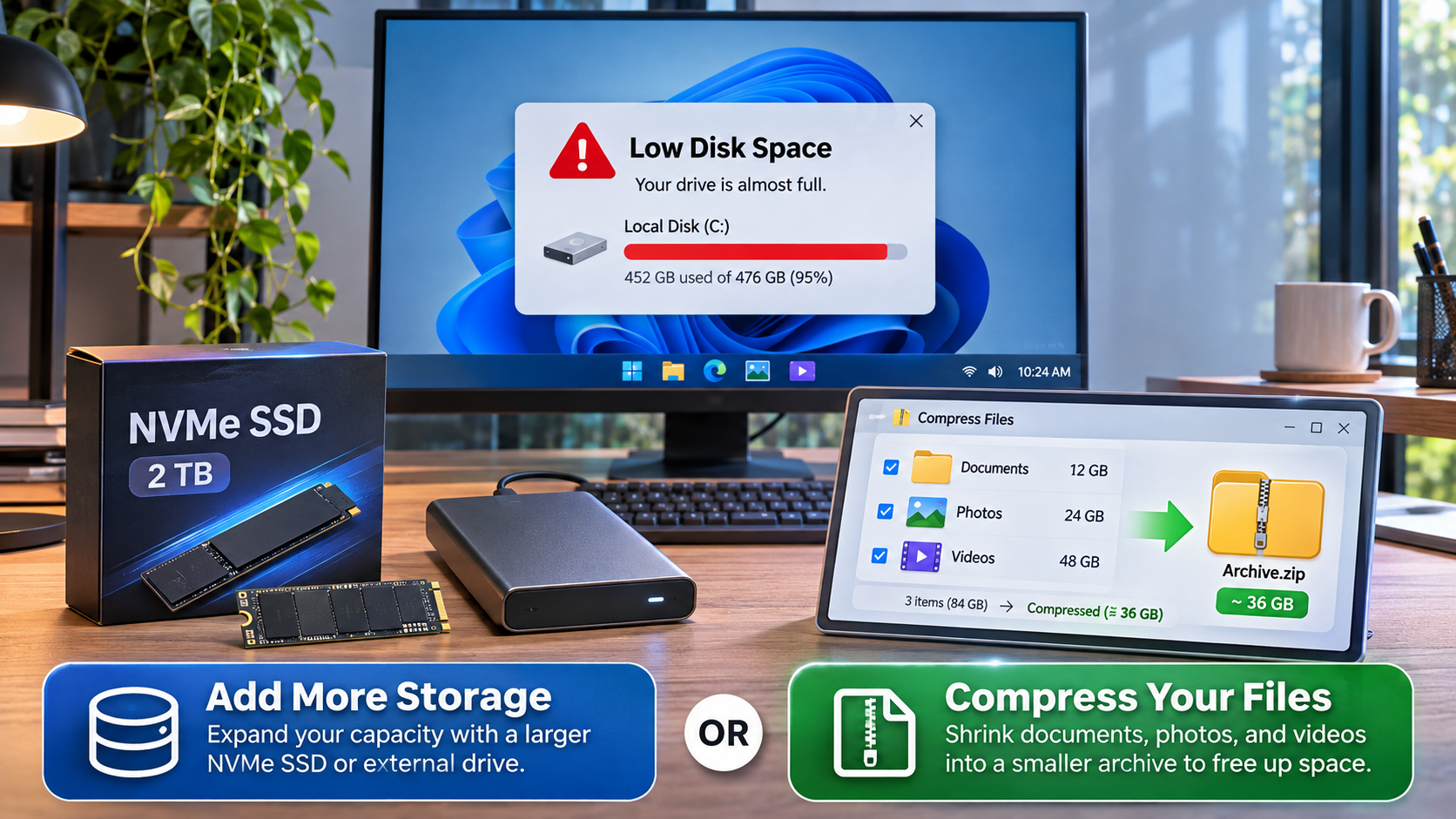
Larger drive or smaller file?
On a PC with a single drive, or one where most of the files end up on the Windows system drive, that familiar low-disk-space warning can eventually appear. After clearing away a few unnecessary files, the usual solution is to look for another SSD, preferably a shiny new one with twice the capacity. It's simple and effective, at least until that drive starts filling up too.
But there's another way of approaching the problem. Instead of constantly increasing how much information we can store, couldn't we concentrate more on reducing the amount of space that information requires? We already do this, of course, through something called compression. It's a technology that's been around for decades and something practically everyone uses, whether they know it or not.
This got me thinking about the relationship between storage capacity and compression. Increasing the space available and reducing the space required are essentially two sides of the same coin. Both achieve a similar result, but they use different resources to get there. One relies primarily on storage hardware, while the other relies on processing power and the time needed to perform the work. Which approach is more economical should depend on the total resources consumed, not simply how much storage space we manage to save.
Making information smaller
Compression works by finding more efficient ways to represent information. Imagine a document containing thousands of repetitions of the same word or sentence. Rather than storing every occurrence separately, a compression program can recognize patterns and represent them using less information. When we open the document, the computer reconstructs the original contents, without losing a single character.
This is called lossless compression, and it's commonly used for documents, software, archives and various types of stored information. However, its effectiveness depends heavily on what we're trying to compress. A document containing many repeated patterns might become dramatically smaller, while another file containing little recognizable repetition might barely shrink at all. There's no guarantee that compression will produce a meaningful reduction in size.
Photographs, music and video introduce another consideration. They frequently use lossy compression, which achieves much smaller files by permanently removing information considered less important to our eyes or ears. JPEG images and video encoded using H.264 or H.265 are familiar examples. This approach can produce impressive results, but it also means that attempting to compress the resulting files again, without losing additional quality, often accomplishes very little.
We therefore have an important distinction. Some information offers considerable opportunities for compression, while other information is already stored in a highly efficient form. Treating everything the same way makes little sense, particularly when compression itself requires resources. A better approach would be to consider what we're storing before deciding whether making it smaller is worthwhile.
The cost of saving space
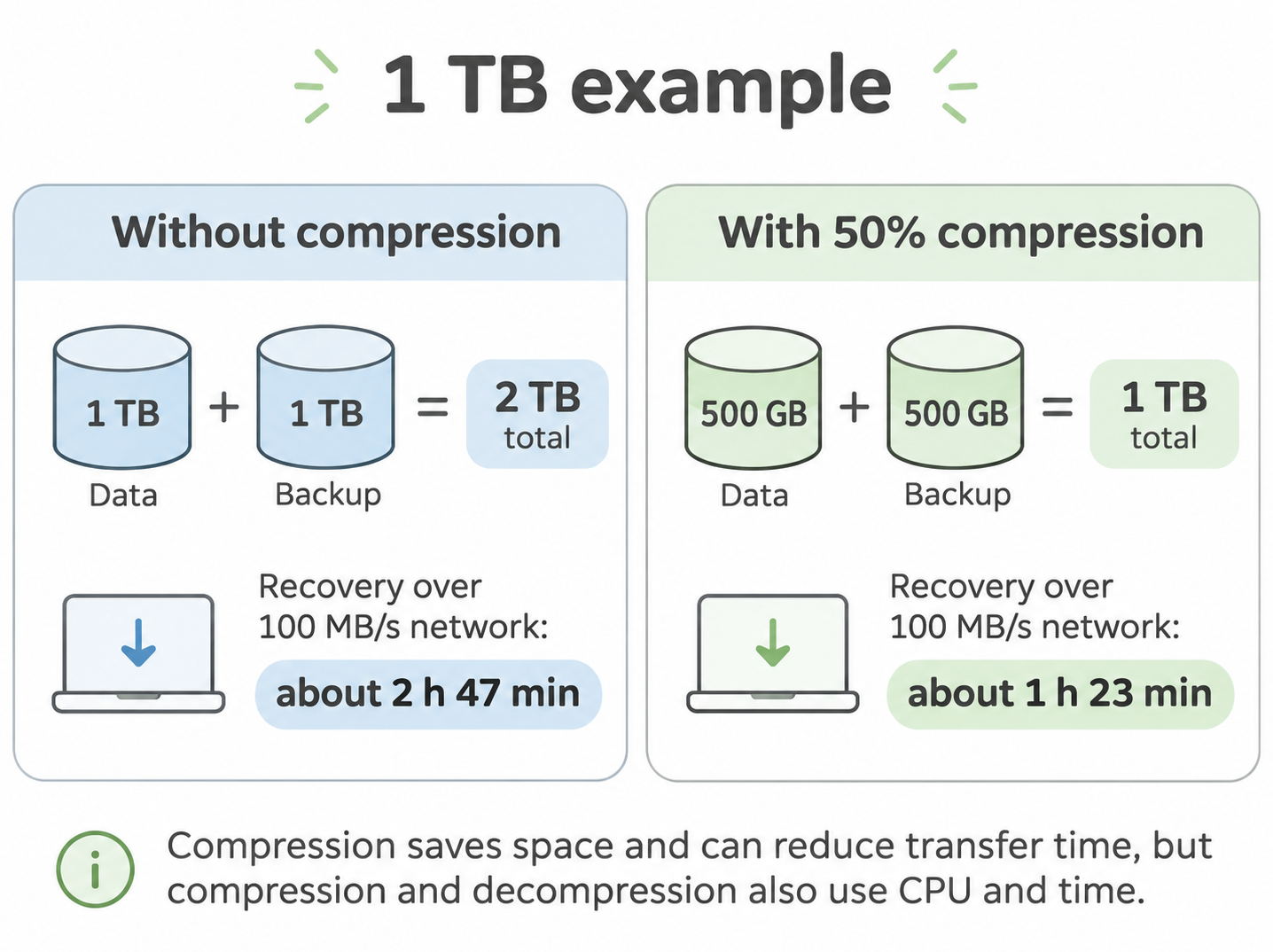
Let's consider a simple example involving 1 TB of information that we want to preserve, including a separate backup. Without compression, we need 1 TB for the original information and another 1 TB for the backup, making 2 TB in total. If we can compress the information to half its original size, both copies together would occupy only 1 TB. We've effectively halved our storage requirements without losing any information.
At first glance, this seems like an obvious improvement. We need less storage hardware, and if the information is kept for several years, the savings continue throughout that period. If we maintain several backup copies, the reduction becomes even more valuable. However, we've overlooked something important: the information must first be compressed, and it must eventually be decompressed whenever we need to use it in its original form.
Both operations require computing resources, and those resources have a cost. The processor consumes electricity, and the work takes time, although modern compression methods can be remarkably efficient. In some cases, compression can even improve performance because the computer has less information to read from or write to storage. The relationship isn't as simple as assuming that compression always makes everything slower.
There's also the matter of transferring information between computers, particularly when creating backups or recovering from a failure. Suppose we need to restore 1 TB of information across a network averaging about 100 MB per second. The transfer alone would take about two hours and forty-seven minutes. With the same information compressed to 500 GB, it would take about one hour and twenty-three minutes.
That's a potential saving of about eighty-four minutes, simply because less information needs to travel across the network. If the receiving computer can decompress the information as quickly as it arrives, much of that saving could translate into a faster recovery. If decompression becomes the slowest part of the process, however, some of the advantage disappears. These are approximate transfer times, not recovery benchmarks; real results also depend on network and storage performance.
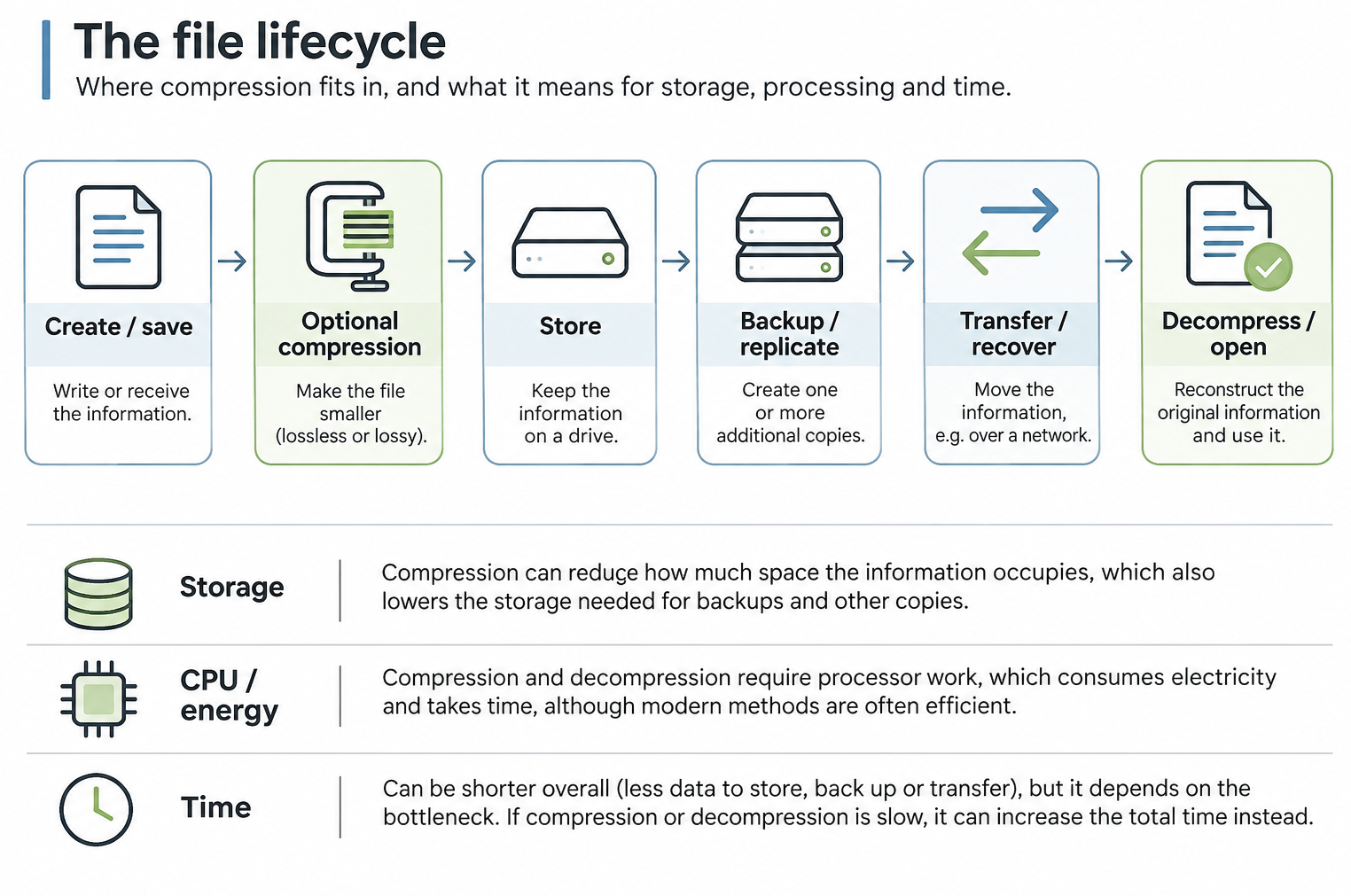
To evaluate the actual benefit, we should consider the entire lifetime of the information. It might be written once, backed up hundreds of times, copied between several systems and retrieved occasionally over many years. Some operations happen simultaneously, while others must wait for a previous operation to finish. The cost of compression therefore depends not only on how much processing is required, but also on how often that work must be repeated.
And time has a value that isn't always easy to express in money. Spending an additional ten minutes creating an overnight backup might be completely insignificant. Spending ten additional minutes recovering an important system during an outage could be a very different matter. The same amount of processing time can therefore have entirely different consequences depending on when and why it's needed.
An example from my own systems
I have a storage and failover project involving approximately 14 TB of information, of which around 12 TB consists of video files already encoded using H.264 or H.265. Since these formats already employ sophisticated compression techniques, applying additional lossless compression would probably achieve very limited savings. Even a hypothetical reduction of 1% would save only about 120 GB across those 12 TB of video. That's not entirely insignificant, but it's hardly a compelling reason to introduce substantial additional processing requirements.
The remaining information is another matter. Documents, configuration files and other material may contain patterns that allow considerably greater reductions in size. Modern filesystems can apply compression automatically, often with very little extra processing work, and some can recognize when further compression would be ineffective. That makes it possible to benefit from compression without having to manually package every file into an archive.
This is where my original assumption becomes less straightforward. I initially considered compression as an additional operation that would continually consume time whenever information was stored or retrieved. In reality, a filesystem can compress information when it is written and decompress it when it is read, without repeatedly compressing unchanged data. Depending on the hardware and the information involved, the extra processing work may be almost unnoticeable.
That doesn't necessarily mean I should enable compression throughout my storage environment. It means I should understand the characteristics of the information and evaluate whether compression offers a useful advantage. For my video collection, buying additional storage capacity may be the more sensible choice. For other types of information, lightweight compression might be preferable, especially if it also reduces backup and recovery times.
Two technologies that keep improving
Meanwhile, the technology industry continues developing both approaches. Storage manufacturers are increasing the amount of information that can fit into a single device, while researchers and software developers are finding more efficient ways to represent information. Neither field has stopped progressing, although the improvements don't necessarily arrive at the same pace or offer the same economic benefits.
In March 2026, Seagate announced that its latest hard-drive technology was reaching capacities of 44 TB in devices supplied to major cloud operators. These are specialized enterprise products rather than the drives most people would install in a home computer, but they illustrate how far storage density has progressed. Solid-state storage has also reached extraordinary capacities, although higher density doesn't automatically translate into lower prices for consumers.
Compression research is progressing in a different direction. Traditional algorithms continue to improve, and artificial intelligence has introduced new techniques capable of recognizing complex patterns in information. Some experimental systems have achieved remarkable reductions in file size, particularly with text, but at an enormous computational cost. In a published 2026 benchmark, one such system compressed 1 GB of Wikipedia text to about 105 MB, yet took roughly a week to compress it and roughly another week to decompress it on powerful hardware.
The experiment wasn't intended as an everyday storage solution, but it illustrates the difference between achieving an impressive compression ratio and producing something economically useful. Saving almost 900 MB sounds attractive until we consider the processing time and hardware required to achieve it. For an ordinary user, storing the original 1 GB would be far cheaper and considerably more convenient. On the other hand, a different algorithm offering a smaller reduction in a fraction of a second might be genuinely valuable.
Storage prices introduce further uncertainty. Increasing manufacturing density has historically helped reduce the cost of storing information, but market demand, production capacity and other economic factors can push prices in the opposite direction. The rapid expansion of AI infrastructure is one example of demand influencing the storage market. Consequently, neither larger storage devices nor more sophisticated compression can be assumed to become continuously cheaper.
Which approach makes more sense?
I started with the idea that increasing storage capacity and reducing information size were competing solutions to the same problem. After considering the different costs involved, I think that remains a useful comparison, although the two approaches are not mutually exclusive. A larger storage device can also hold compressed information, making both technologies complementary rather than strictly competitive.
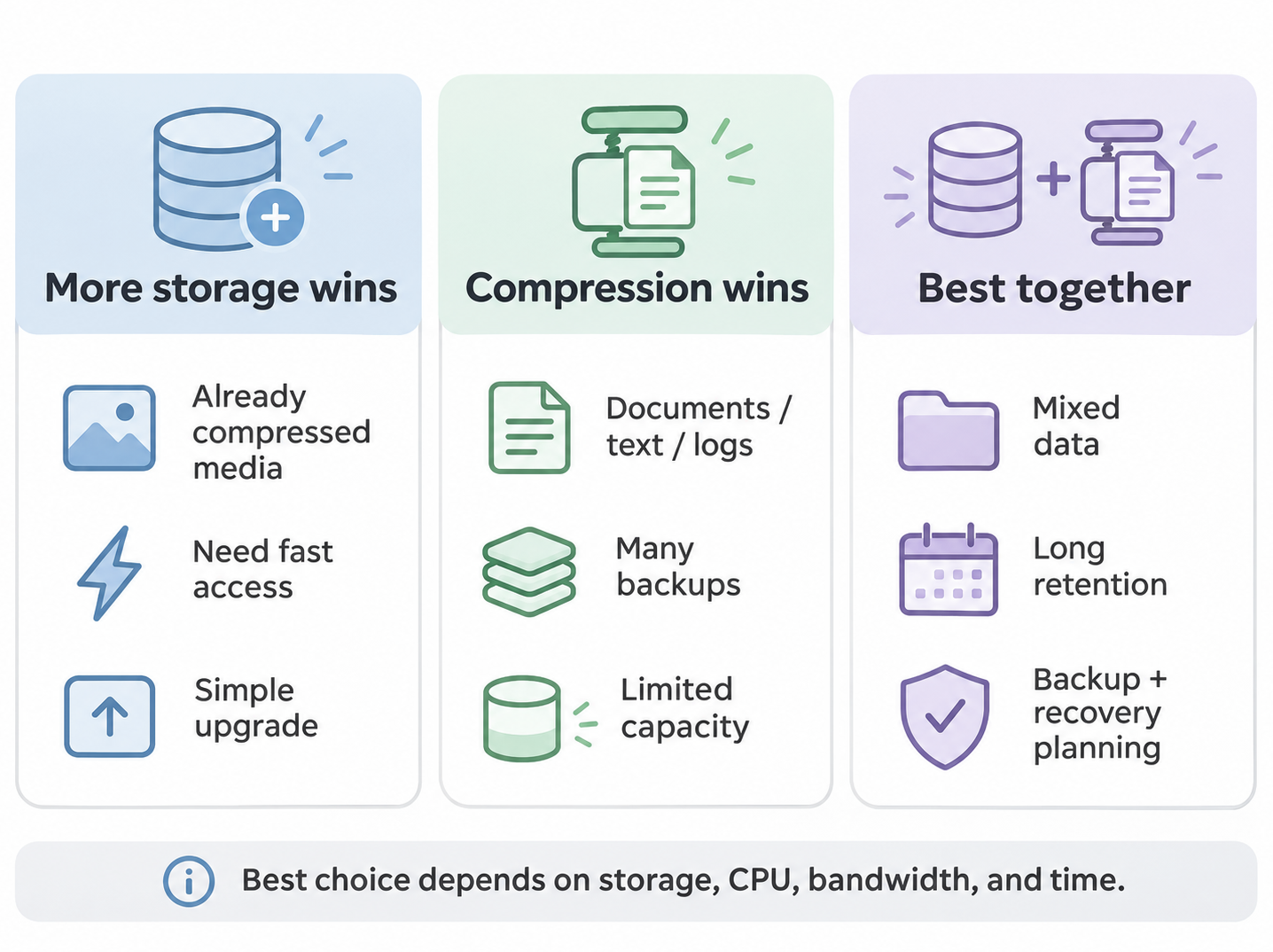
For an ordinary computer user storing photographs, games and movies, buying additional capacity will often be the easiest and most reasonable solution. Much of that information may already be compressed, leaving relatively little to gain from further processing. For an organization storing large quantities of documents, databases and backups, compression could substantially reduce storage requirements and the amount of information transferred between systems. The benefits would depend on the information itself, the hardware involved and how frequently that information needs to be accessed.
What matters, then, is the complete chain of operations, from saving information to eventually recovering it. We need to consider storage hardware, processing requirements, electricity, backup capacity, data transfers and the time consumed along the way. We should also consider how long the information will be retained and how many times it is likely to be copied or retrieved. Only then can we make a meaningful comparison between the resources saved and the resources required to achieve those savings.
Perhaps the most useful conclusion is that reducing file size isn't necessarily the same as reducing costs, just as increasing storage capacity isn't necessarily a wasteful solution. The most economical approach is whichever combination allows us to preserve and recover the information we need while consuming the fewest resources and meeting our practical requirements. That includes time, which can be almost irrelevant during one operation and critically important during another.
So the next time Windows complains about insufficient disk space, I may still solve the problem by purchasing another shiny NVMe drive. There's nothing wrong with choosing the simplest solution when it also happens to be the most sensible one. But I now have a better appreciation of why the alternative deserves consideration, and why making files smaller is only part of a much larger calculation.
Research references
Seagate, Mozaic 4+ and 44 TB hard drives (March 2026); Tufa Labs, tufazip compression research (2026); Large Text Compression Benchmark; and OpenZFS compression documentation.