
The Origins of a HomeLab #1
The Origins of a HomeLab #1
This is Part 1 of a series tracing a home lab from its first NAS purchase in 2013 to the rack servers, firewalls, and domain controllers of today. It started, as these things always do, with a modest problem.
The Problem Everyone Hits
In 2013 our household had between three and five desktops running at any given time. Kids at home, multiple machines, and exactly zero coordination around where files actually lived. Documents on one machine, photos on another, media scattered wherever it happened to land when someone downloaded it. The question was always the same: which computer or USB drive is that file on?
It's a problem every household with more than one machine eventually runs into, and most people solve it with a USB drive they carry between rooms. We did that for a while. It worked right up until it didn't — and the moment you realise you've been editing a file on the wrong copy is the moment you start thinking about a proper file share.
The solution was obvious enough: one device, always on, accessible from every machine in the house. A NAS.
Choosing the Box
This was 2013. No AI assistants to summarise product comparisons. No chatbot to ask "what's the best 6-bay NAS for a home with three desktops?" The research was done the old-fashioned way: hardware review sites, forum threads, specification comparisons, and a healthy dose of reading between the lines.
The market at the time was dominated by Synology and QNAP. Both had strong reputations. Both had price tags to match. The unit I landed on was an Asustor AS-606T — a six-bay NAS that sat a step below the big two in brand recognition but matched or exceeded them on specifications for the money. It was a decision made on paper, without anyone to ask for a second opinion. The kind of decision you either get right or learn from expensively.
Six 2 TB drives went in, configured in RAID 5. That gave roughly 10 TB of usable space — a number that felt generous in 2013. It wouldn't stay that way.
| Detail | Specification | 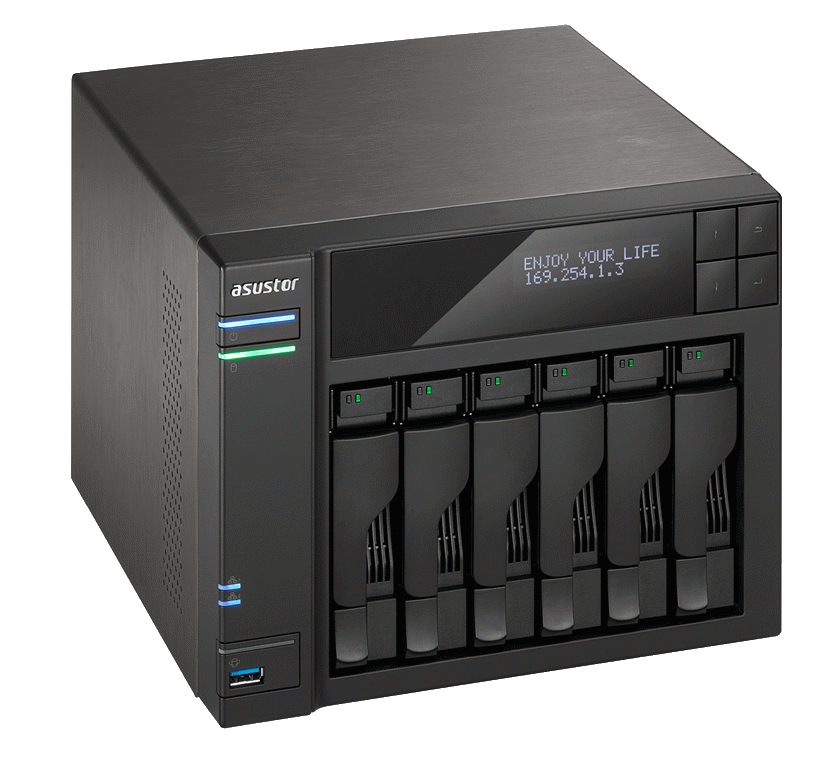 |
| Model | Asustor AS-606T — 6-bay tower NAS | |
| Storage | 6 × 2 TB in RAID 5 (~10 TB usable) | |
| CPU | Intel® Atom™ 2.13 GHz Dual-Core Processor | |
| RAM | 3 GB — sufficient for file serving, not much else | |
| Date | 2013 — still running in 2026 |
What Went On It
Everything. That was the point — one place for all of it. Documents, media, project files, household records, and the ever-growing photo collection. The NAS became the central landing zone for the household's data, and within weeks it was obvious that this was how it should always have been. No more guessing which machine held the current version. No more USB drives migrating between rooms. Files went on the NAS, and everyone pulled from there. Asustor's ADM operating system supports a range of add-on applications — media servers, download managers, Docker containers, the usual NAS ecosystem. I deliberately left all of that alone. Three gigabytes of RAM and a mobile-class CPU made the choice easy: this box had one job, and I strongly felt that anything beyond file serving would compromise it. Better to do one thing reliably than three things badly.
The Photo Problem
The NAS was also supposed to solve the photo situation. It didn't. If anything, it made the scope of the problem visible for the first time.
Photos arrived from multiple directions: phone cameras syncing to iCloud or Google Photos, cameras offloading to desktop machines, screenshots and downloads landing wherever they happened to land. Some photos existed in the cloud, some on the NAS, some on individual machines, and a concerning number existed in all three places simultaneously — or worse, in slightly different versions across all three. No canonical master. No single source of truth.
Several attempts were made to sort this out over the years. None were completed. The data kept growing, there was never a clean starting point, and getting every household member aligned on a consistent workflow proved harder than any technical problem. iCloud and Google Photos have their own opinions about how photos should be organised, and those opinions rarely align with a folder hierarchy on a NAS.
This remains an open issue in 2026, even somewhat graver. The tools under consideration have changed — Photoprism, Damselfly — but the fundamental challenge hasn't: deduplication across three decades of accumulated photos from multiple sources, with no clean baseline to start from. The NAS didn't create this problem. It just made it impossible to ignore.
Outgrowing It
Ten terabytes felt spacious in 2013. By 2016 it didn't. Data has a way of growing that consistently outpaces whatever you allocated, and a household that's actively using a file share generates storage demand faster than anyone estimates when setting it up.
The drives were upgraded twice over the NAS's lifetime — first to six 4 TB drives, also in RAID5, then to the current set of six 6 TB drives. The last time to a RAID6 configuration, each time a multi-day rebuild. The original 2 TB and 4TB drives are long gone, replaced without ceremony. The 6 TB set, giving roughly 24 TB usable, is what runs today.
But capacity wasn't the only constraint. The NAS had 3 GB of RAM and a CPU designed for low power consumption, not performance. It handled file serving perfectly well — that's what it was built for. But it couldn't also serve as a backup target for other systems without bogging down, and it certainly couldn't run virtual machines or containers. As the ambitions for the home network grew, the NAS increasingly felt like it was doing exactly one thing and had no room to do anything more.
What was needed was a proper server. Something with real processing power, enough RAM to run services alongside storage, and the headroom to grow into whatever came next. The NAS wouldn't be replaced — it would be demoted.
Keeping the Protocol current
By 2017, it was painfully obvious that SMB v1 was flawed — a real hazard to run on any storage device exposed to a network. After some consultations with Asustor and working through early adoption issues in ADM's support for later SMB versions, I enabled SMB 2/3 and disabled v1 permanently.
The Demotion
When the first real server arrived — a custom-built AMD Opteron machine with a Supermicro dual-socket board, assembled from used parts — the NAS handed over its primary file-serving duties and moved to backup. The transition involved copying the entire data set from the Opteron to the Asustor with full verification.
That week-long copy has been repeated two or three more times since, each time as part of a hardware change or a drive upgrade cycle. It's never fast. It's never exciting. It's the kind of operational discipline that you either do properly or regret the one time you don't. The NAS accepted its demotion gracefully. It doesn't run apps. It doesn't host containers. It doesn't serve media. It sits on the network at 192.168.10.100, receives backup data on schedule, and does absolutely nothing else. That simplicity is precisely why it's still reliable in 2026.
Still Running... but
I am looking around now and then for a replacement. While the physical capabilities are enough, the hardware sufficient and capacity not yet wanting, the software is aging. Asustor have launched several upgrades to its ADM OS, but my NAS is incompatible and I do not intend to try anything else. It works. This is of course not a huge problem, since it only sits in a secluded place receiving files and is not exposed in any way
Next in the series: Free enterprise hardware arrives from work, VMware ESXi enters the picture, and the NAS gets its first companion — a pair of HPE ProLiant DL380s that came with a storage arithmetic problem nobody saw coming.