
Real Failover Backup
QFiles Failover — A Simple Idea That Got Complicated
Introduction to the QFiles Failover project
Back in August 2026, I started working on what I thought would be a fairly straightforward improvement to my home server setup. I wanted a second machine ready to take over file-sharing duties if the primary server went down. I'd had something similar with an older NAS arrangement, and while moving to a Proxmox-based environment had brought plenty of advantages, that particular convenience had been lost somewhere along the way.
I already had backups, of course. Several kinds, in fact. ZFS snapshots, Restic and Proxmox Backup Server were all doing their respective jobs, and I was reasonably comfortable with the protection they provided. But there's a rather significant difference between having your files safely stored somewhere and being able to access them when the machine normally serving them has decided to take an unscheduled holiday. With roughly 14 TiB of data involved, restoring everything from backup wasn't exactly an attractive first option, particularly when all I really wanted was to get the file shares working again.
There was also no particular reason to buy more hardware. I already had two reasonably capable machines, connected over a dedicated 10 GbE network. The primary ran Proxmox VE, with the actual Samba service in a Linux container, while the second machine was running Proxmox Backup Server and had substantial storage of its own. Surely, I thought, we could make better use of what was already there.
The original grand plan
I don't think I ever sat down and wrote a proper requirements specification at the beginning. If I had, it would probably have looked something like this:
- Keep a reasonably fresh copy of all my files on the second server.
- Don't copy 14 TiB every time something changes. That would be silly.
- If the main server dies, let me use the other one instead.
- Windows should still be able to access the shares without too much fuss.
- Keep the files encrypted. No reason to make things less secure.
- Don't interfere with the backups I already have.
- When the main server is repaired, move everything back and carry on as before.
- Don't let the two machines mess up each other's files.
- Make it reasonably simple to operate. I don't want to spend half a day remembering how it works.
- Don't make me buy more hardware unless there's a very good reason.
- And, preferably, don't break anything while setting it up.
Nothing terribly ambitious, really. I wasn't trying to build a complete high-availability cluster, nor did I particularly want the complexity that comes with one. The idea was simply to have another machine capable of serving the files while I sorted out whatever had happened to the first.
As it turned out, several of those innocent-looking requirements concealed some rather substantial complications.
Getting the files across was the easy part
The initial technical work went reasonably well. ZFS already provided snapshots and incremental replication, and Syncoid offered a practical way of transferring changes without repeatedly copying the entire filesystem. The data could remain encrypted during replication, and the standby copy would normally stay locked and unmounted. That suited me rather well; there was no reason to have a second accessible copy of everything sitting around when it wasn't needed.
We configured Samba directly on the standby host, arranged the necessary permissions and made sure it could provide the same shares as the primary. There was no attempt to make the second server automatically impersonate the first. In an emergency, I could access its own network address instead. This was a conscious choice, since I wanted to decide when failover should happen rather than have two machines enthusiastically making decisions about my files without asking me.
After a fair amount of configuration and testing, we had a working standby. The replicated files were accessible, Windows could connect to the shares, and we could create new files on the second machine. At that point, the original idea appeared to have been achieved. We had a usable replacement file server, and the existing backup arrangements remained intact.
Unfortunately, that was about the point where the interesting problems began.
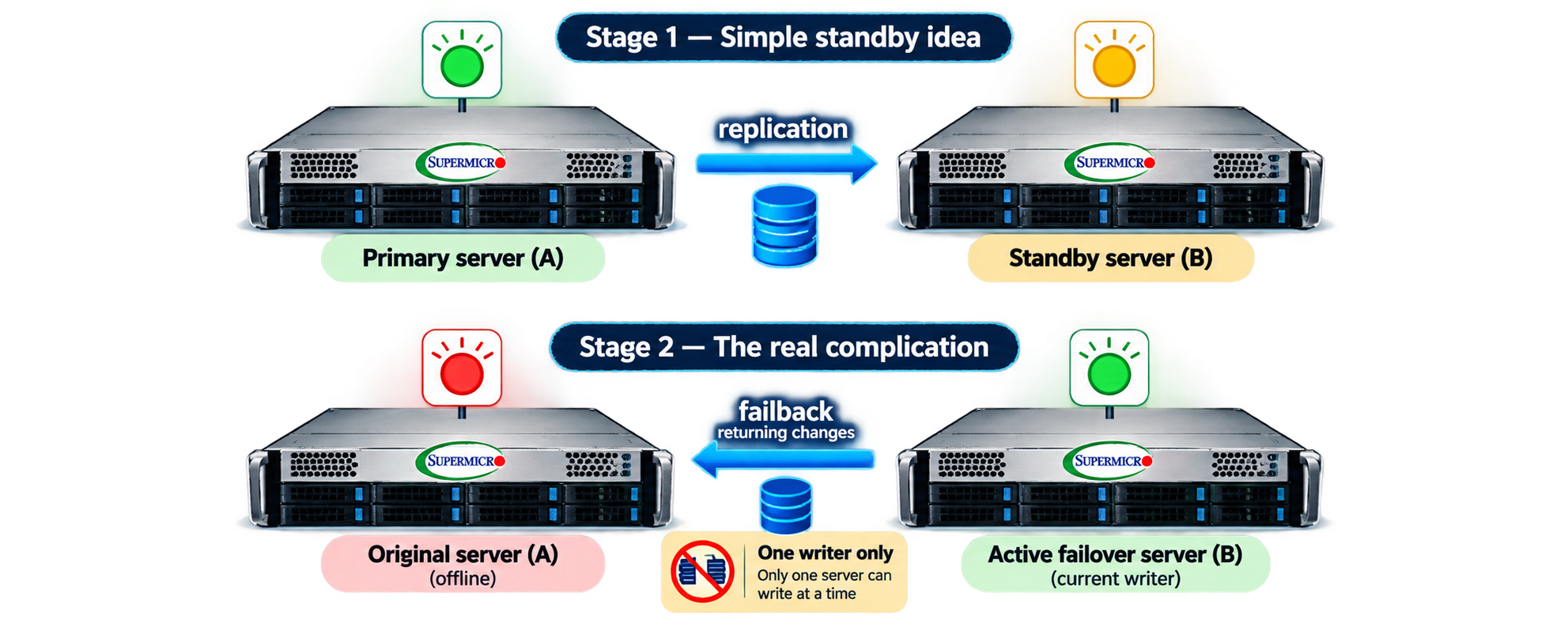
Consider what happens when the primary server eventually returns. Suppose it fails on Monday, the standby takes over, and everyone continues working normally. By Wednesday the original machine has been repaired and is ready to resume its duties. We now have two machines containing different versions of what was originally the same filesystem. The primary still has everything up to the point where it failed, while the standby has that data plus whatever has been changed, added or deleted in the meantime.
Which machine is now correct? To us the answer is fairly obvious, but computers have an unfortunate habit of doing exactly what they're instructed to do, even when those instructions are spectacularly inappropriate under the circumstances. Simply starting the original file server again could expose outdated data, and allowing both machines to accept changes would be an excellent way of creating a mess.
This led us into the question of authority, and ultimately one of the more important design decisions in the entire project. Only one machine should ever be allowed to provide writable access to QFiles. A returning primary must not automatically assume it is entitled to resume service, and the standby must retain control until the recovery procedure has properly returned the data and responsibility to the original machine.
What had started as a replication arrangement was gradually developing into a system with explicit authority management, fencing, guarded state transitions and a growing collection of scripts intended to prevent us from doi
ng something regrettable. Somewhere around here, the phrase "just make the second server take over" began looking a little optimistic.
Getting home again
Failover itself is only half the exercise. Getting back to normal is at least as important, and considerably easier to get wrong. Everything written to the standby during an outage must eventually find its way back to the primary, preferably without losing anything, overwriting valid data or accidentally making an incomplete filesystem available to users.
We developed procedures around common ZFS snapshots, controlled transfers, recovery stages and checks intended to establish that the data being returned really was what we expected. The controller also had to know which machine currently held authority, what stage the operation had reached, and whether it was safe to continue. A useful consequence of this approach is that the system can refuse an operation when something doesn't look right, rather than blindly proceeding because a script has reached its next line.
The complete process has since been exercised in controlled tests, including creating files on the standby, transferring those changes back to the primary and restoring normal replication. That's a significant milestone, although it doesn't mean every possible failure condition has been explored. Testing that a procedure works when everything goes according to plan is one thing; establishing what happens when something fails halfway through is quite another.
And then there was the question of storage capacity.
With approximately 14 TiB of live data, keeping additional recovery copies can consume an extraordinary amount of disk space. Our original failback design used a separate staging filesystem on the primary server, providing somewhere to receive and validate returning data before replacing the original filesystem. It was a sensible precaution, but maintaining that additional copy alongside the live data and standby replica came at a considerable storage cost. Having what amounted to three substantial copies of the same filesystem wasn't quite the economy I'd had in mind when deciding to reuse existing hardware.
More recently, we've been investigating whether ZFS copy-on-write techniques can substantially reduce that overhead. By allowing a temporary recovery filesystem to share existing snapshot data, rather than maintaining another full-sized copy, there are opportunities to make the arrangement considerably more economical. The experiments so far have been promising, although incorporating those improvements into the complete production recovery procedure still requires care and further validation. Storage efficiency is useful, but not if we achieve it by introducing new ways of losing data.
This has become something of a recurring theme throughout the project. An approach works, we discover a limitation, reconsider some assumptions and eventually find a better way. Occasionally the better way also introduces an entirely new set of problems, which at least prevents things from becoming boring.
A little help from artificial intelligence
There's another aspect to all this worth mentioning. Much of the architecture discussion, scripting, troubleshooting and code review has taken place in collaboration with AI assistants, initially Claude and subsequently ChatGPT and Codex. That has been an interesting experience in its own right, particularly as the project has grown beyond the sort of thing one might reasonably expect to solve with a handful of shell scripts.
The collaboration has worked remarkably well at times, and rather less remarkably at others. AI can explore alternatives, explain unfamiliar details, produce useful code and sometimes identify problems that have escaped everyone else's attention. It can also confidently suggest something that doesn't work, misunderstand an important requirement or produce a technically impressive solution to entirely the wrong problem.
We've had occasions where one assistant has spotted problems in another's work, where apparently sound designs have fallen apart during testing, and where the actual machines have disagreed with all of us. My own contribution has often been to question assumptions, define what I actually want, evaluate the proposed compromises and perform the tests that establish whether the ideas work outside a discussion.
I don't consider those difficulties an argument against using AI. Quite the opposite, provided we remember that generating a solution and demonstrating that it works are two very different things. The human still needs to understand the objectives, recognise unacceptable compromises and ultimately take responsibility for the result. Having access to a remarkable amount of technical knowledge doesn't remove the need for judgement, especially when dealing with systems intended to protect irreplaceable data.
Where we are now
QFiles Failover has grown considerably beyond its original purpose, although the underlying objective hasn't really changed. I still want two existing machines to provide a practical and reasonably straightforward way of keeping my files available when one of them fails. The difference is that I now have a much better appreciation of everything required to make that happen safely, and considerably more respect for the complications hiding behind apparently simple requirements.
The project isn't entirely finished, nor is it intended as some universal answer to high availability. It's an engineering exercise based on my own infrastructure, requirements and willingness to experiment, with a mixture of established technology, custom development and a fair amount of trial and error.
In the following articles, I'll explore what we've built, why certain decisions were made, what didn't work and what we've learned along the way. There are plenty of technical details worth examining, but also some interesting lessons about the development process itself, including the collaboration between human judgement and artificial intelligence.
For now, I'll simply observe that what began as an attempt to keep a second copy of some files has turned into a fairly elaborate exercise in ensuring that only one machine is allowed to use them.
Apparently, copying the files was the easy part.