<?xml version="1.0" encoding="utf-8"?>
<feed xmlns="http://www.w3.org/2005/Atom" xmlns:media="http://search.yahoo.com/mrss/">
    <title>SohoLab by Conram.it</title>
    <link href="https://www.conram.it/soholab/feed.xml" rel="self" />
    <link href="https://www.conram.it/soholab" />
    <updated>2026-06-05T08:53:04+02:00</updated>
    <author>
        <name>Richard</name>
    </author>
    <id>https://www.conram.it/soholab</id>

    <entry>
        <title>Welcome to SohoLab — What is This?</title>
        <author>
            <name>Richard</name>
        </author>
        <link href="https://www.conram.it/soholab/welcome-to-soholab-what-is-this.html"/>
        <id>https://www.conram.it/soholab/welcome-to-soholab-what-is-this.html</id>

        <updated>2026-06-05T08:47:22+02:00</updated>
            <summary type="html">
                <![CDATA[
                    The Soholab SohoLab is the homelab section of CONRAM.IT — a dedicated space for writing about what actually happens when you run real hardware at home emulating when a bunch of computers suddenly became a lesson in almost corporate infrastructure. The lab is small-office/home-office scale:&hellip;
                ]]>
            </summary>
        <content type="html">
            <![CDATA[
                <h2>The Soholab</h2>
<p>SohoLab is the homelab section of <a class="underline underline underline-offset-2 decoration-1 decoration-current/40 hover:decoration-current focus:decoration-current" href="https://www.conram.it">CONRAM.IT</a> — a dedicated space for writing about what actually happens when you run real hardware at home emulating when a bunch of computers suddenly became a lesson in almost corporate infrastructure.</p>
<p class="font-claude-response-body break-words whitespace-normal leading-[1.7]">The lab is small-office/home-office scale: rack-mounted hardware, Proxmox as the hypervisor platform, a mix of VMs and containers, network gear that earns its keep, and storage with opinions. It runs continuously, breaks occasionally, and gets rebuilt when something better comes along or when the previous approach turns out to have been optimistic.</p>
<p class="font-claude-response-body break-words whitespace-normal leading-[1.7]">What gets written up here is what comes out of that — component choices that weren't obvious, configurations that took longer than they should have, hardware quirks that aren't well documented anywhere else, and code snippets that solved a specific problem and might solve yours too. Not a manual. More of a record of what we did and what we'd do differently.</p>
<p class="font-claude-response-body break-words whitespace-normal leading-[1.7]">The back catalogue migrated from the root site: firewall build, LSI/MegaRAID storage management, SFTP backup pipelines, and a few others. More to come as the lab evolves and the backlog gets written up.</p>
<p class="font-claude-response-body break-words whitespace-normal leading-[1.7]">General IT commentary, career writing, and the occasional gaming detour stays at <a class="underline underline underline-offset-2 decoration-1 decoration-current/40 hover:decoration-current focus:decoration-current" href="https://www.conram.it">conram.it</a>. This is the infrastructure layer.</p>
            ]]>
        </content>
    </entry>
    <entry>
        <title>Introducing Gjallarform</title>
        <author>
            <name>Richard</name>
        </author>
        <link href="https://www.conram.it/soholab/contactulus-a-simple-self-hosted-contact-form-for-static-sites.html"/>
        <id>https://www.conram.it/soholab/contactulus-a-simple-self-hosted-contact-form-for-static-sites.html</id>

        <updated>2026-06-04T13:51:00+02:00</updated>
            <summary type="html">
                <![CDATA[
                    Gjallarform We are releasing Gjallarform — a lightweight contact form engine designed for static and low-maintenance websites like Publii. Many site owners forget that EU websites must provide a working, reliable way for visitors to get in touch — and that external form services often&hellip;
                ]]>
            </summary>
        <content type="html">
            <![CDATA[
                <h2>Gjallarform</h2>
<p>We are releasing Gjallarform — a lightweight contact form engine designed for static and low-maintenance websites like Publii. Many site owners forget that EU websites must provide a working, reliable way for visitors to get in touch — and that external form services often raise GDPR concerns.</p>
<p><a href="https://www.conram.it/soholab/gjallarform.html" target="_blank" rel="noopener noreferrer">Link to the Project page on this site.</a></p>
<p>Gjallarform keeps everything on your own server: no third-party processors, no tracking, no external scripts, no CMS, no API keys. Just PHP and sendmail.</p>
<p>Spam protection is layered: a honeypot field catches automated bots silently, a time trap rejects suspiciously fast submissions, and an arithmetic challenge handles the human operators who get past the first two. Each layer is independent — turn on what you need.</p>
<p>It has been running on conram.it and rikardmalmborg.se long enough to have survived a real-world spam attack. That is what prompted the math challenge feature.</p>
<p>Version 0.95 public beta. Four files, one folder, one config block. PHP 8.1+, nothing else required.</p>
<p><a href="https://github.com/Ainz/gjallarform">View on GitHub</a></p>
            ]]>
        </content>
    </entry>
    <entry>
        <title>The origins of a HomeLab #2</title>
        <author>
            <name>Richard</name>
        </author>
        <link href="https://www.conram.it/soholab/the-origins-of-a-homelab-2.html"/>
        <id>https://www.conram.it/soholab/the-origins-of-a-homelab-2.html</id>

        <updated>2026-05-26T16:56:24+02:00</updated>
            <summary type="html">
                <![CDATA[
                    The Origins of a HomeLab #2 Part 2 of a series tracing a home lab from its first NAS in 2013 to the infrastructure of today. This time: decommissioned enterprise hardware, the first real steps into virtualisation, a wooden rack in the garage, a proper&hellip;
                ]]>
            </summary>
        <content type="html">
            <![CDATA[
                <h3>The Origins of a HomeLab #2</h3>
<p><em>Part 2 of a series tracing a home lab from its first NAS in 2013 to the infrastructure of today. This time: decommissioned enterprise hardware, the first real steps into virtualisation, a wooden rack in the garage, a proper cabinet, and the first deliberate home-built server.</em></p>
<h3>Free Enterprise Hardware</h3>
<p>In 2016 or thereabouts, two HPE ProLiant DL380 G7 servers were decommissioned at work. The kind of thing that happens in corporate IT: hardware reaches end of lifecycle, gets written off, and someone asks if anyone wants it before it disappears into recycling.</p>
<p>I wanted them.</p>
<p>Two identical 2U rack servers, fully populated SFF drive bays, redundant 750W power supplies, and the particular heft of enterprise hardware designed to survive a datacentre rather than impress on a desk. These were machines built for a purpose well above anything a home network strictly needed. That was, of course, part of the appeal.</p>
<table>
<tbody>
<tr>
<td><strong>Server</strong></td>
<td>HPE ProLiant DL380 G7 (×2, identical)</td>
</tr>
<tr>
<td><strong>Form factor</strong></td>
<td>2U rack, SFF drive bays</td>
</tr>
<tr>
<td><strong>Drives</strong></td>
<td>~480 GB SFF per bay</td>
</tr>
<tr>
<td><strong>PSU</strong></td>
<td>Dual redundant 750W Common Slot</td>
</tr>
<tr>
<td><strong>Power draw</strong></td>
<td>~200W each under typical load</td>
</tr>
<tr>
<td><strong>Hypervisor</strong></td>
<td>VMware ESXi (free tier)</td>
</tr>
<tr>
<td><strong>Acquired</strong></td>
<td>≈2014–2015, decommissioned from work</td>
</tr>
<tr>
<td><strong>Departed</strong></td>
<td>Sold as working servers, 2022–2023</td>
</tr>
</tbody>
</table>
<h3>The Wooden Rack</h3>
<p>The problem with enterprise rack servers is that they need somewhere to live. Before the proper cabinet arrived, the answer was a wooden rack in the garage — a DIY affair that held the ProLiants and, later, the Opteron. No photos survive from this era, and the rack itself is long gone. It served its purpose: keep the hardware off the floor, provide some structure, and establish the garage as the physical home of the lab.</p>
<p>It was not pretty. It was not engineered. But it held the hardware without complaint for years, and sometimes that is all a rack needs to do.</p>
<h3>First Steps with ESXi</h3>
<p>VMware ESXi went on both ProLiants, using the free tier. At the time, that was a very useful entry point: a proper hypervisor, free to use, with enough limitations to remind you that VMware still had a business model, but not enough to stop a home lab from learning with it.</p>
<p>This was my first real encounter with virtualisation. Windows VMs, Linux VMs, temporary machines, experiments that were created, tested, broken, deleted and rebuilt. Nothing permanent. Nothing critical. The Asustor NAS continued handling the household file storage. The ProLiants were for learning.</p>
<p>That distinction matters. The ProLiants taught me virtualisation, but they did not become the storage answer. They made it easier to experiment with operating systems and services, but they also exposed the limits of solving every problem with whatever enterprise hardware happened to be available.</p>
<h3>The Storage Problem</h3>
<p>The DL380 G7 is a 2U server with SFF — small form factor — drive bays. That sounds flexible until the individual drives are considered. These were roughly 480 GB drives, the kind that made sense in a datacentre where density, redundancy and IOPS could matter more than raw capacity.</p>
<p>In a home lab where the data collection was already pushing into double-digit terabytes, the arithmetic simply did not work.</p>
<p>Even with every bay filled across both servers, and even with no sensible redundancy at all, the total capacity could not cover the storage needs. There were too many small drives and not enough accumulated space to build a useful storage layout from them. The Asustor, with its six 3.5-inch bays and consumer-grade drives, held more useful storage than either ProLiant.</p>
<p>I have since changed my view somewhat. Many small SFF drives can work well in the right configuration, especially for VM storage, mirrors, performance-oriented pools or tiered layouts. But at the time, with a growing dataset that needed volume above all else, the SFF form factor was simply the wrong fit.</p>
<p>The realisation was not dramatic. It was just arithmetic. Enterprise hardware is built for enterprise problems, and home storage is often not one of them.</p>
<h3>The First Deliberate Server Build</h3>
<p>The ProLiants had arrived opportunistically. The Asustor had solved the first storage problem. But the lab needed something more deliberate: a machine chosen less because it was available and more because it suited the role.</p>
<p>There was an earlier AMD build on a Tyan board — a C32-based Opteron machine that predated the Supermicro build. The details of that machine are lost to time and a lack of documentation. It existed, it ran, it eventually gave way to something better documented. The record begins properly with the Supermicro.</p>
<p>The Opteron server was based on a <a href="https://www.supermicro.com/products/archive/motherboard/h8dcl-6f" title="Supermicro H8DCL-6F" target="_blank" rel="noopener noreferrer">Supermicro H8DCL-6F</a>, a dual-socket server board with IPMI, dual Intel gigabit networking and an onboard LSI 2008 SAS controller. The CPUs were two <a href="https://www.cpu-world.com/CPUs/Bulldozer/AMD-Opteron%204386%20-%20OS4386WLU8KHK.html" title="AMD Opteron 4386" target="_blank" rel="noopener noreferrer">AMD Opteron 4386</a> processors, giving the machine 16 physical cores in total.</p>
<table>
<tbody>
<tr>
<td><strong>Motherboard</strong></td>
<td><a href="https://www.supermicro.com/products/archive/motherboard/h8dcl-6f" target="_blank" rel="noopener noreferrer">Supermicro H8DCL-6F</a></td>
</tr>
<tr>
<td><strong>CPU</strong></td>
<td>2 × AMD Opteron 4386 (16 cores total)</td>
</tr>
<tr>
<td><strong>Memory</strong></td>
<td>Samsung DDR3 ECC, 64 GB working configuration</td>
</tr>
<tr>
<td><strong>Storage controller</strong></td>
<td>Integrated LSI 2008 8-port SAS</td>
</tr>
<tr>
<td><strong>Primary OS</strong></td>
<td>Windows Server 2012 R2</td>
</tr>
<tr>
<td><strong>Chassis</strong></td>
<td>Tower case (not rackmounted — shelved in the rack)</td>
</tr>
<tr>
<td><strong>Cooling</strong></td>
<td>Two ASUS tower coolers on the dual Opteron CPUs</td>
</tr>
</tbody>
</table>
<p>The Opteron was not elegant. It lived in a tower case rather than a proper rackmount chassis, and it simply sat on a shelf in the rack. Inside, the two Opterons were cooled by a pair of old ASUS tower coolers — more enthusiast improvisation than conventional server design.</p>
<p>This was the first machine that felt less like an appliance and more like infrastructure. The ProLiants remained the virtualisation playground. The Asustor became less central over time. The Opteron became the practical backbone: storage, file serving, Windows Server duties, RAID experiments and eventually the platform around which more serious FreeNAS questions started to form.</p>
<h3>Going Vertical — The Compaq Cabinet</h3>
<p>By May 2020, the wooden rack had served its time. The lab had grown beyond what a DIY frame in the garage could reasonably hold, and the opportunity arose to acquire a proper enterprise rack cabinet: a Compaq 9000, 42U, full-depth, manufactured in June 2001 according to its QA label.</p>
<p>A 42U cabinet from the pre-HP-merger Compaq era is a serious piece of furniture. Heavy, overbuilt, perforated mesh doors front and rear for airflow, and more rack space than a home lab could reasonably fill. It went in the garage, and the ProLiants were mounted properly on rails by September 2020. The Opteron, still in its tower case, sat on a shelf inside. The wooden rack disappeared without ceremony.</p>
<p>The cabinet changed the lab in ways that were not entirely practical. It imposed a physical structure that made the setup feel more deliberate. Servers had positions. Cable routes had paths. There was a front and a back, a top and a bottom, and the expectation that things would be installed rather than placed.</p>
<h3>Life in the Garage</h3>
<p>None of this was quiet. Each ProLiant drew roughly 200 watts and made the kind of noise enterprise fans are designed to make: functional, persistent and completely indifferent to domestic sensibilities. The Opteron added its own heat and airflow requirements. The garage absorbed this without complaint. Running the same equipment in a living space would have been a different conversation entirely.</p>
<p>This was also the period where the lab started developing roles. There was no longer just "the storage box" or "the servers". There was a NAS, a virtualisation environment, a storage server, a rack, a switch, power distribution, backups, and an increasingly long list of things that had to be remembered when something stopped behaving.</p>
<p>That sounds obvious in hindsight. At the time, it was the quiet transition from owning hardware to running infrastructure.</p>
<h3>The First Storage Rabbit Hole</h3>
<p>FreeNAS, now TrueNAS, started appearing around this period, although not yet as a clean, dedicated storage platform. At first it was another experiment among many: could ZFS be brought into a Windows- and virtualisation-heavy home lab without rebuilding everything from scratch?</p>
<p>The short answer was: almost.</p>
<p>The longer answer became its own story.</p>
<p>The Opteron made that question more interesting because it already had several ingredients storage people care about: a server board, ECC memory, an LSI controller, a hardware RAID history and enough disks to make the result matter. It also had exactly the wrong temptation: perhaps it would be possible to keep Windows Server, keep the RAID mindset, and still somehow gain the benefits of FreeNAS and ZFS.</p>
<p>That is where the difference between "it boots" and "it should be trusted" started to become relevant. Storage platforms are not ordinary VMs. Disks, controllers, SMART data, passthrough, scrubs, resilvers and filesystem assumptions all matter.</p>
<h3>The Exit</h3>
<p>By 2022 the ProLiants had served their purpose. The virtualisation experiments they enabled had laid groundwork that would eventually lead to Proxmox on more deliberate hardware. The storage mismatch had been solved by other machines. ESXi itself was still running, still stable, still doing what it did well, but the lab had outgrown what the DL380s could offer.</p>
<p>They were sold as working servers sometime in 2022 or 2023. Both were still fully functional, both with their original drive complements, both with the 750W PSUs that had run reliably for years. They left the way they arrived: capable enterprise machines looking for a workload that matched their strengths.</p>
<p>The Opteron stayed longer in the story. It had become part of the lab's operating history: the first deliberate server build, the first serious storage platform, and the machine that pushed me from simple file serving into the messy territory where controllers, filesystems, virtualisation and recovery planning overlap.</p>
<h3>The Broadcom Footnote</h3>
<p>A year or two after the ProLiants left, Broadcom completed its acquisition of VMware and proceeded to dismantle the free ESXi tier that had made home lab virtualisation accessible to an entire generation of IT professionals. The timing was fortunate. The lab had already moved on.</p>
<p>But the old free ESXi tier was not merely a freebie. It was a learning path. Many professionals learned virtualisation at home on ESXi and later carried that familiarity into work. Removing that path may have made sense on a spreadsheet, but it also closed one of the more useful bridges between curiosity, self-training and professional competence.</p>
<p><strong>Next in the series:</strong> FreeNAS enters the lab properly, or at least almost properly. ZFS, Hyper-V, passthrough disks, SMART data, stalled SMB copies, bad drives, and the uncomfortable lesson that storage systems punish assumptions faster than ordinary servers do.</p>
            ]]>
        </content>
    </entry>
    <entry>
        <title>The Origins of a HomeLab #1</title>
        <author>
            <name>Richard</name>
        </author>
        <link href="https://www.conram.it/soholab/the-origins-of-a-homelab-1.html"/>
        <id>https://www.conram.it/soholab/the-origins-of-a-homelab-1.html</id>

        <updated>2026-05-26T14:15:25+02:00</updated>
            <summary type="html">
                <![CDATA[
                    The Origins of a HomeLab #1 This is Part 1 of a series tracing a home lab from its first NAS purchase in 2013 to the rack servers, firewalls, and domain controllers of today. It started, as these things always do, with a modest problem.
                ]]>
            </summary>
        <content type="html">
            <![CDATA[
                <h2>The Origins of a HomeLab #1</h2>
<p><em>This is Part 1 of a series tracing a home lab from its first NAS purchase in 2013 to the rack servers, firewalls, and domain controllers of today. It started, as these things always do, with a modest problem.</em></p>
<h3 id="mcetoc_chron1_01">The Problem Everyone Hits</h3>
<p>In 2013 our household had between three and five desktops running at any given time. Kids at home, multiple machines, and exactly zero coordination around where files actually lived. Documents on one machine, photos on another, media scattered wherever it happened to land when someone downloaded it. The question was always the same: <em>which computer or USB drive is that file on?</em></p>
<p>It's a problem every household with more than one machine eventually runs into, and most people solve it with a USB drive they carry between rooms. We did that for a while. It worked right up until it didn't — and the moment you realise you've been editing a file on the wrong copy is the moment you start thinking about a proper file share.</p>
<p>The solution was obvious enough: one device, always on, accessible from every machine in the house. A NAS.</p>
<h3 id="mcetoc_chron1_02">Choosing the Box</h3>
<p>This was 2013. No AI assistants to summarise product comparisons. No chatbot to ask "what's the best 6-bay NAS for a home with three desktops?" The research was done the old-fashioned way: hardware review sites, forum threads, specification comparisons, and a healthy dose of reading between the lines.</p>
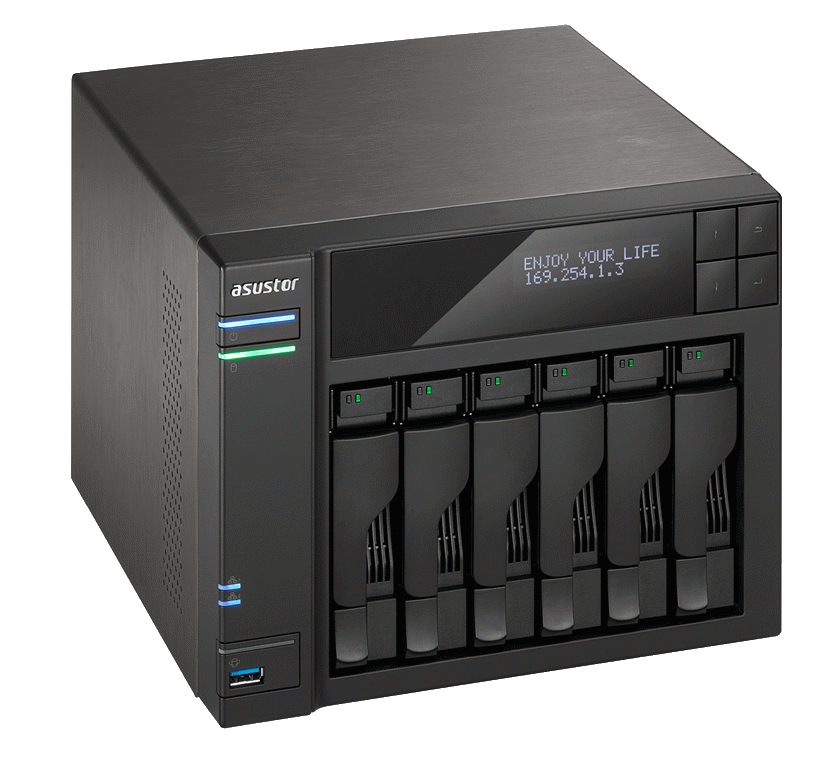
<p>The market at the time was dominated by Synology and QNAP. Both had strong reputations. Both had price tags to match. The unit I landed on was an <strong>Asustor AS-606T</strong> — a six-bay NAS that sat a step below the big two in brand recognition but matched or exceeded them on specifications for the money. It was a decision made on paper, without anyone to ask for a second opinion. The kind of decision you either get right or learn from expensively.</p>
<p>Six 2 TB drives went in, configured in RAID 5. That gave roughly 10 TB of usable space — a number that felt generous in 2013. It wouldn't stay that way.</p>
<table style="border-collapse: collapse; width: 90.3134%;" border="0" cellspacing="0" cellpadding="0">
<tbody>
<tr>
<td style="width: 22.7448%;"><strong>Detail</strong></td>
<td style="width: 53.0447%;"><strong>Specification</strong></td>
<td style="width: 24.3158%; vertical-align: middle; text-align: center;" rowspan="6"><img loading="lazy" style="max-width: 100%; height: auto;" src="https://www.conram.it/soholab/media/posts/47/asustor-as-606t.png" alt="Asustor AS-606T" sizes="(max-width: 1920px) 100vw, 1920px" srcset="https://www.conram.it/soholab/media/posts/47/responsive/asustor-as-606t-xs.webp 640w ,https://www.conram.it/soholab/media/posts/47/responsive/asustor-as-606t-sm.webp 768w ,https://www.conram.it/soholab/media/posts/47/responsive/asustor-as-606t-md.webp 1024w ,https://www.conram.it/soholab/media/posts/47/responsive/asustor-as-606t-lg.webp 1366w ,https://www.conram.it/soholab/media/posts/47/responsive/asustor-as-606t-xl.webp 1600w ,https://www.conram.it/soholab/media/posts/47/responsive/asustor-as-606t-2xl.webp 1920w"></td>
</tr>
<tr>
<td style="width: 22.7448%;">Model</td>
<td style="width: 53.0447%;"><a href="https://www.asustor.com/sv-SE/product?p_id=3" title="Asustor AS-606T" target="_blank" rel="noopener noreferrer">Asustor AS-606T</a> — 6-bay tower NAS</td>
</tr>
<tr>
<td style="width: 22.7448%;">Storage</td>
<td style="width: 53.0447%;">6 × 2 TB in RAID 5 (~10 TB usable)</td>
</tr>
<tr>
<td style="width: 22.7448%;">CPU</td>
<td style="width: 53.0447%;">Intel® Atom™ 2.13 GHz Dual-Core Processor</td>
</tr>
<tr>
<td style="width: 22.7448%;">RAM</td>
<td style="width: 53.0447%;">3 GB — sufficient for file serving, not much else</td>
</tr>
<tr>
<td style="width: 22.7448%;">Date</td>
<td style="width: 53.0447%;">2013 — still running in 2026</td>
</tr>
</tbody>
</table>
<h3 id="mcetoc_chron1_03">What Went On It</h3>
<p>Everything. That was the point — one place for all of it. Documents, media, project files, household records, and the ever-growing photo collection. The NAS became the central landing zone for the household's data, and within weeks it was obvious that this was how it should always have been. No more guessing which machine held the current version. No more USB drives migrating between rooms. Files went on the NAS, and everyone pulled from there. Asustor's ADM operating system supports a range of add-on applications — media servers, download managers, Docker containers, the usual NAS ecosystem. I deliberately left all of that alone. Three gigabytes of RAM and a mobile-class CPU made the choice easy: this box had one job, and I strongly felt that anything beyond file serving would compromise it. Better to do one thing reliably than three things badly.</p>
<h4 id="mcetoc_chron1_04">The Photo Problem</h4>
<p>The NAS was also supposed to solve the photo situation. It didn't. If anything, it made the scope of the problem visible for the first time.</p>
<p>Photos arrived from multiple directions: phone cameras syncing to iCloud or Google Photos, cameras offloading to desktop machines, screenshots and downloads landing wherever they happened to land. Some photos existed in the cloud, some on the NAS, some on individual machines, and a concerning number existed in all three places simultaneously — or worse, in slightly different versions across all three. No canonical master. No single source of truth.</p>
<p>Several attempts were made to sort this out over the years. None were completed. The data kept growing, there was never a clean starting point, and getting every household member aligned on a consistent workflow proved harder than any technical problem. iCloud and Google Photos have their own opinions about how photos should be organised, and those opinions rarely align with a folder hierarchy on a NAS.</p>
<p>This remains an open issue in 2026, even somewhat graver. The tools under consideration have changed — Photoprism, Damselfly — but the fundamental challenge hasn't: deduplication across three decades of accumulated photos from multiple sources, with no clean baseline to start from. The NAS didn't create this problem. It just made it impossible to ignore.</p>
<h3 id="mcetoc_chron1_05">Outgrowing It</h3>
<p>Ten terabytes felt spacious in 2013. By 2016 it didn't. Data has a way of growing that consistently outpaces whatever you allocated, and a household that's actively using a file share generates storage demand faster than anyone estimates when setting it up.</p>
<p>The drives were upgraded twice over the NAS's lifetime — first to six 4 TB drives, also in RAID5, then to the current set of six 6 TB drives. The last time to a RAID6 configuration, each time a multi-day rebuild. The original 2 TB and 4TB drives are long gone, replaced without ceremony. The 6 TB set, giving roughly 24 TB usable, is what runs today.</p>
<p>But capacity wasn't the only constraint. The NAS had 3 GB of RAM and a CPU designed for low power consumption, not performance. It handled file serving perfectly well — that's what it was built for. But it couldn't also serve as a backup target for other systems without bogging down, and it certainly couldn't run virtual machines or containers. As the ambitions for the home network grew, the NAS increasingly felt like it was doing exactly one thing and had no room to do anything more.</p>
<p>What was needed was a proper server. Something with real processing power, enough RAM to run services alongside storage, and the headroom to grow into whatever came next. The NAS wouldn't be replaced — it would be <em>demoted</em>.</p>
<h3>Keeping the Protocol current</h3>
<p>By 2017, it was painfully obvious that SMB v1 was flawed — a real hazard to run on any storage device exposed to a network. After some consultations with Asustor and working through early adoption issues in ADM's support for later SMB versions, I enabled SMB 2/3 and disabled v1 permanently. </p>
<h3 id="mcetoc_chron1_06">The Demotion</h3>
<p>When the first real server arrived — a custom-built AMD Opteron machine with a Supermicro dual-socket board, assembled from used parts — the NAS handed over its primary file-serving duties and moved to backup. The transition involved copying the entire data set from the Opteron to the Asustor with full verification.</p>
<p>That week-long copy has been repeated two or three more times since, each time as part of a hardware change or a drive upgrade cycle. It's never fast. It's never exciting. It's the kind of operational discipline that you either do properly or regret the one time you don't. The NAS accepted its demotion gracefully. It doesn't run apps. It doesn't host containers. It doesn't serve media. It sits on the network at 192.168.10.100, receives backup data on schedule, and does absolutely nothing else. That simplicity is precisely why it's still reliable in 2026.</p>
<h3 id="mcetoc_chron1_07">Still Running... but</h3>
<p>I am looking around now and then for a replacement. While the physical capabilities are enough, the hardware sufficient and capacity not yet wanting, the software is aging. Asustor have launched several upgrades to its ADM OS, but my NAS is incompatible and I do not intend to try anything else. It works. This is of course not a huge problem, since it only sits in a secluded place receiving files and is not exposed in any way</p>
<p><strong>Next in the series:</strong> Free enterprise hardware arrives from work, VMware ESXi enters the picture, and the NAS gets its first companion — a pair of HPE ProLiant DL380s that came with a storage arithmetic problem nobody saw coming.</p>
            ]]>
        </content>
    </entry>
    <entry>
        <title>A Firewall Journey</title>
        <author>
            <name>Richard</name>
        </author>
        <link href="https://www.conram.it/soholab/moving-away-from-unifi-a-firewall-journey.html"/>
        <id>https://www.conram.it/soholab/moving-away-from-unifi-a-firewall-journey.html</id>
        <media:content url="https://www.conram.it/soholab/media/posts/23/alive.png" medium="image" />
            <category term="security"/>
            <category term="life"/>
            <category term="internet"/>
            <category term="hardware"/>
            <category term="firewall"/>
            <category term="cybersecurity"/>

        <updated>2025-08-13T10:15:14+02:00</updated>
            <summary type="html">
                <![CDATA[
                        <img src="https://www.conram.it/soholab/media/posts/23/alive.png" alt="ChatGPT" />
                    Protecting your Lan Over the past few years, my firewall setup has been on its own little odyssey. It’s been a mix of curiosity, necessity, and sometimes just the sheer fun of trying something new—abiding the need for a safe solution. In 2023, I arrived&hellip;
                ]]>
            </summary>
        <content type="html">
            <![CDATA[
                    <p><img src="https://www.conram.it/soholab/media/posts/23/alive.png" class="type:primaryImage" alt="ChatGPT" /></p>
                <h2>Protecting your Lan</h2>
<p>Over the past few years, my firewall setup has been on its own little odyssey. It’s been a mix of curiosity, necessity, and sometimes just the sheer fun of trying something new—abiding the need for a safe solution.</p>
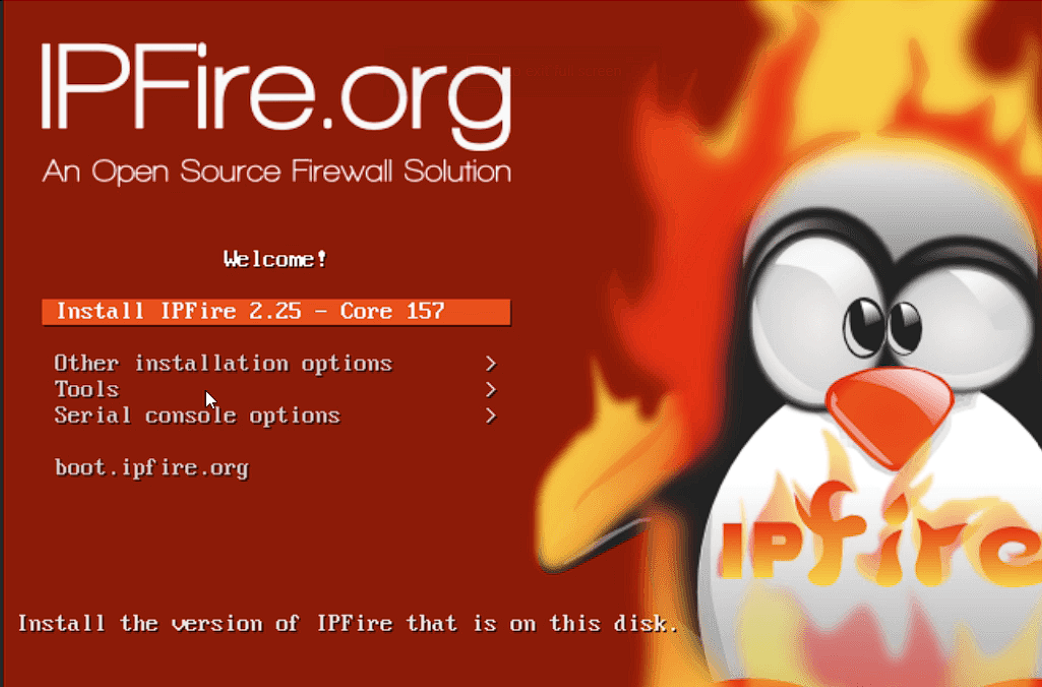
<p>In 2023, I arrived at IPFire after spending time with OPNsense and MikroTik. I was tired of wrestling with interfaces that felt like they were built for a certification exam rather than for the person actually running the network. <a href="https://www.ipfire.org" title="IPFire" target="_blank" rel="noopener noreferrer">IPFire</a> was a breath of fresh air: practical, straightforward, and not buried under layers of abstraction.</p>
<p>By spring 2024, I took a leap. I swapped IPFire for <a href="https://ui.com/us/en" title="UniFi" target="_blank" rel="noopener noreferrer">UniFi</a>, chasing that promise of more automation, more built‑in “intelligence,” and a management platform that could take a bit of the day‑to‑day burden off my shoulders. At the time, I couldn’t find any other on‑premises firewall that offered that kind of unified, polished control out of the box. And for a while, it delivered exactly what I wanted.</p>
<p>But over time, the more I used UniFi, the more I realised it simply wasn’t going to work as expected. My requirements hadn’t changed, my network did not grow in complexity, but the reality of daily use exposed several shortcomings I couldn’t ignore:</p>
<ol>
<li>The automation that first seemed like a convenience often overrode or limited the precise control I needed.</li>
<li>Its “intelligence” was surface‑level—good for (very) small, simple networks but not enough for detailed, policy‑driven segmentation.</li>
<li>Firewall rules were locked behind a simplified interface that hid or abstracted critical options.</li>
<li>VLAN‑centric design made true isolation cumbersome without workarounds.</li>
<li>Troubleshooting tools were too shallow—summarised logs and metrics instead of the raw data needed for fast, accurate diagnosis.</li>
<li>Device and manufacturer identification was unreliable or outright wrong, making it harder to inventory, track, and manage connected equipment accurately.</li>
</ol>
<h2>Core Requirements for My Firewall</h2>
<p>These aren’t nice‑to‑haves; they’re dealbreakers for me:</p>
<ul>
<li>Granular firewall rules at both L3 and L4</li>
<li>A policy‑first design with object‑based rules</li>
<li>No enforced cloud dependency</li>
<li>Honest, raw observability for troubleshooting</li>
<li>Flexibility to mix and match hardware vendors</li>
<li>Ability to run on my own server hardware, hence bare-metal installation of the firewall OS.</li>
</ul>
<h2>Where UniFi Fell Short for Me</h2>
<ul>
<li>Firewall rules abstracted behind a simplified UI</li>
<li>VLAN‑first design instead of true, policy‑driven isolation</li>
<li>Limited ability to group and manage hosts or services logically</li>
<li>Architecture that leans toward the cloud even when self‑hosted</li>
<li>Summarised logs and metrics that hide the finer details</li>
<li>Inaccurate or inconsistent device/manufacturer identification</li>
</ul>
<h2>Considering Alternatives</h2>
<p>When it was time to move on, I didn't just jump back to IPFire blindly. I looked at pfSense, OPNsense, and others. They all have strengths—pfSense with its rich feature set, OPNsense with its modern interface. But IPFire matched my current needs without overcomplicating things, and I already knew its quirks from my time with it in 2023.</p>
<h3>IPFire vs UniFi</h3>
<figure class="post__image post__image--right"><a href="https://www.ipfire.org/docs/installation" title="IPFire Setup" target="_blank" rel="noopener noreferrer"> <img loading="lazy" src="https://www.conram.it/soholab/media/posts/23/ipfire-setup-old.png" alt="IPFire setup" width="300" sizes="(max-width: 1920px) 100vw, 1920px" srcset="https://www.conram.it/soholab/media/posts/23/responsive/ipfire-setup-old-xs.webp 640w ,https://www.conram.it/soholab/media/posts/23/responsive/ipfire-setup-old-sm.webp 768w ,https://www.conram.it/soholab/media/posts/23/responsive/ipfire-setup-old-md.webp 1024w ,https://www.conram.it/soholab/media/posts/23/responsive/ipfire-setup-old-lg.webp 1366w ,https://www.conram.it/soholab/media/posts/23/responsive/ipfire-setup-old-xl.webp 1600w ,https://www.conram.it/soholab/media/posts/23/responsive/ipfire-setup-old-2xl.webp 1920w"> </a>
<figcaption>A picture from a typical setup of IPFire</figcaption>
</figure>
<p>IPFire gives me full custom L3/L4 rules, logical grouping of hosts and services, root shell access, no cloud tie‑ins, and clear, enforceable isolation policies. UniFi, while polished, limits firewall granularity, ties grouping to VLANs, hides advanced settings, and depends more on its ecosystem. Troubleshooting in IPFire means direct access to logs and counters; in UniFi, you get summaries. Device identification in IPFire is whatever I configure; UniFi's guesses are often wrong.</p>
<p>When it was time to move on, I didn’t just jump back to IPFire blindly. I looked at pfSense, OPNsense, and others. They all have strengths—pfSense with its rich feature set, OPNsense with its modern interface. But IPFire matched my current needs without overcomplicating things, and I already knew its quirks from my time with it in 2023.</p>
<h2>Migration Blueprint</h2>
<ol>
<li>Define zones by trust level (WAN, LAN‑core, User LAN, IoT, Guest, Services)</li>
<li>Create host and service objects to make policy rules human‑readable</li>
<li>Write rules that state your intent clearly and log what matters</li>
<li>Default‑deny between zones; document every exception and why it exists</li>
</ol>
<h2>Closing Thought</h2>
<p>I didn’t leave UniFi because it’s a bad product—it’s not. I left because, despite my initial optimism, it didn’t meet the same requirements I had from the start. Firewalls should bend to your policy, not the other way around. Whether it’s IPFire, pfSense, OPNsense, or something else entirely, the best choice is the one that matches your requirements today, with the freedom to change when tomorrow arrives.</p>
<p><a href="https://www.ipfire.org" title="Get IPFire, you too!" target="_blank" rel="ugc noopener noreferrer">Get IPFire, you too!</a></p>
            ]]>
        </content>
    </entry>
    <entry>
        <title>Installing LSI / Avago Megaraid Storage Manager</title>
        <author>
            <name>Richard</name>
        </author>
        <link href="https://www.conram.it/soholab/installing-lsi-avago-megaraid-storage-manager.html"/>
        <id>https://www.conram.it/soholab/installing-lsi-avago-megaraid-storage-manager.html</id>

        <updated>2023-02-13T12:07:00+01:00</updated>
            <summary type="html">
                <![CDATA[
                    HTML source view Screenshots: replace all [SCREENSHOT: ...] placeholders with actual images --> There are questions about this floating around the internet like digital tumbleweed, and I have personally tripped over the same obstacles more than once. The LSI/Avago MegaRAID Storage Manager (MSM) is not&hellip;
                ]]>
            </summary>
        <content type="html">
            <![CDATA[
                <!--
  conram.it post: Installing LSI / Avago MegaRAID Storage Manager
  Category: Infrastructure / Storage
  Date: February 13, 2023 (antedated)
  Paste into Publii post editor > HTML source view
  Screenshots: replace all [SCREENSHOT: ...] placeholders with actual images
-->
<p class="post-intro">There are questions about this floating around the internet like digital tumbleweed, and I<figure class="post__image post__image--right"><img loading="lazy"  src="https://www.conram.it/soholab/media/posts/43/avago.png" alt="" width="624" height="402" sizes="(max-width: 1920px) 100vw, 1920px" srcset="https://www.conram.it/soholab/media/posts/43/responsive/avago-xs.webp 640w ,https://www.conram.it/soholab/media/posts/43/responsive/avago-sm.webp 768w ,https://www.conram.it/soholab/media/posts/43/responsive/avago-md.webp 1024w ,https://www.conram.it/soholab/media/posts/43/responsive/avago-lg.webp 1366w ,https://www.conram.it/soholab/media/posts/43/responsive/avago-xl.webp 1600w ,https://www.conram.it/soholab/media/posts/43/responsive/avago-2xl.webp 1920w"></figure> have personally tripped over the same obstacles more than once.</p>
<p>The LSI/Avago MegaRAID Storage Manager (MSM) is not exactly new technology, but if you are still running one of these RAID cards — rebranded or otherwise — you probably still need the management interface.</p>
<p>So here it is, documented...</p>
<div> </div>
<div class="notice notice--info"><strong>Intended audience:</strong> Owners of LSI-based RAID cards, rebranded or not, who want a working management interface on a Windows machine. This includes cards not officially listed in the MSM <code>ReadMe.txt</code> — the supported device list has gaps. I personally run this on a machine with a rebranded Huawei SAS3108 that does not appear on that list. It works.</div>
<div> </div>
<div class="notice notice--info"><strong>Before you proceed:</strong> The package includes a <code>ReadMe.txt</code> with official installation instructions. This guide is an alternative — arguably more readable, certainly more annotated. If you prefer the official route, it is in there. If MSM or Java is already installed on your target machine, sort that out first. This guide assumes a clean slate; upgrade paths have not been tested.</div>
<blockquote>
<div class="notice notice--neutral"><strong>Disclaimer</strong>: Provided as-is, no warranties. There are other Java configurations, other approaches, and entirely other solutions. This guide assumes you are not a Java developer with knowledge about version management. If you are — feel free to improvise, but the path described here is not wrong simply because a different path also exists.</div>
</blockquote>
<h2>What You Need</h2>
<p>Download the required package here: <a href="https://www.conram.it/soholab/media/files/WORKS_17.05.06.00_MSM_Windows.zip" target="_blank" rel="noopener noreferrer" download>[DOWNLOAD LINK]</a> 104MB, approximately.</p>
<p>The package contains the MSM installer, the 32-bit Oracle JRE Setup, and the <code>javax.activation.jar</code> file that MSM quietly requires but does not always make obvious.</p>
<h2>Installation</h2>
<h3>Step 1 — Install Oracle Java i586 (32-bit)</h3>
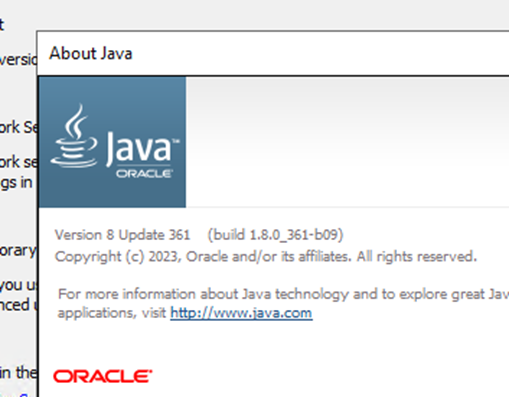
<p>Yes, 32-bit. On an x64 OS. The x64 version of Java did not work; the 32-bit version does. Do not overthink it.</p>
<figure class="post__image post__image--center align-center"><img loading="lazy"  style="margin-bottom: 1.37143rem; margin-left: 1.37143rem; outline: rgba(13, 139, 242, 0.55) solid 2.66667px !important;" src="https://www.conram.it/soholab/media/posts/43/install-java.png" alt="" width="509" height="397" sizes="(max-width: 1920px) 100vw, 1920px" srcset="https://www.conram.it/soholab/media/posts/43/responsive/install-java-xs.webp 640w ,https://www.conram.it/soholab/media/posts/43/responsive/install-java-sm.webp 768w ,https://www.conram.it/soholab/media/posts/43/responsive/install-java-md.webp 1024w ,https://www.conram.it/soholab/media/posts/43/responsive/install-java-lg.webp 1366w ,https://www.conram.it/soholab/media/posts/43/responsive/install-java-xl.webp 1600w ,https://www.conram.it/soholab/media/posts/43/responsive/install-java-2xl.webp 1920w"></figure>
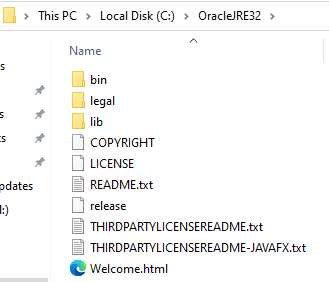
<p>During installation, choose a destination folder with <strong>no spaces in </strong><strong style="font-size: inherit;">the path</strong><span style="font-size: inherit;">. <br>This matters later. </span></p>
<p><span style="font-size: inherit;">A clean example:</span><code>C:\OracleJRE32</code></p>
<figure class="post__image post__image--center align-center"><img loading="lazy"  style="margin-bottom: 1.37143rem; margin-left: 1.37143rem; color: #02192b; font-weight: bold; outline: rgba(13, 139, 242, 0.55) solid 2.66667px !important;" src="https://www.conram.it/soholab/media/posts/43/java-destination.png" alt="" width="329" height="282" sizes="(max-width: 1920px) 100vw, 1920px" srcset="https://www.conram.it/soholab/media/posts/43/responsive/java-destination-xs.webp 640w ,https://www.conram.it/soholab/media/posts/43/responsive/java-destination-sm.webp 768w ,https://www.conram.it/soholab/media/posts/43/responsive/java-destination-md.webp 1024w ,https://www.conram.it/soholab/media/posts/43/responsive/java-destination-lg.webp 1366w ,https://www.conram.it/soholab/media/posts/43/responsive/java-destination-xl.webp 1600w ,https://www.conram.it/soholab/media/posts/43/responsive/java-destination-2xl.webp 1920w"></figure>
<p>The installer included in the package is the <span style="font-size: inherit;"> version tested with this guide.</span></p>
<p>You can use a newer version from the Oracle site if preferred, but your mileage may vary.</p>
<h3>Step 2 — Set the JRE_HOME Environment Variable</h3>
<p>Once Java is installed, create a system environment variable pointing to the installation folder:</p>
<ul>
<li><strong>Variable name:</strong> <code>JRE_HOME</code></li>
<li><strong>Variable value:</strong> <code>C:\OracleJRE32</code> (or wherever you installed it)</li>
</ul>
<p>Environment variables live in <em>System Properties &gt; Advanced &gt; Environment Variables</em>.</p>
<figure class="post__image post__image--center"><img loading="lazy"  src="https://www.conram.it/soholab/media/posts/43/system-variables.png" alt="" width="436" height="47" sizes="(max-width: 1920px) 100vw, 1920px" srcset="https://www.conram.it/soholab/media/posts/43/responsive/system-variables-xs.webp 640w ,https://www.conram.it/soholab/media/posts/43/responsive/system-variables-sm.webp 768w ,https://www.conram.it/soholab/media/posts/43/responsive/system-variables-md.webp 1024w ,https://www.conram.it/soholab/media/posts/43/responsive/system-variables-lg.webp 1366w ,https://www.conram.it/soholab/media/posts/43/responsive/system-variables-xl.webp 1600w ,https://www.conram.it/soholab/media/posts/43/responsive/system-variables-2xl.webp 1920w"></figure>
<p>This applies to most Windows versions. Microsoft's own documentation covers it if you need a walkthrough: <a href="https://learn.microsoft.com/en-us/windows/win32/procthread/environment-variables" target="_blank" rel="noopener noreferrer">Environment Variables — Microsoft Learn</a>.</p>
<h3>Step 3 — Reboot</h3>
<p>Reboot the machine. Environment variables need a fresh session to take effect.</p>
<h3>Step 4 — Verify Java</h3>
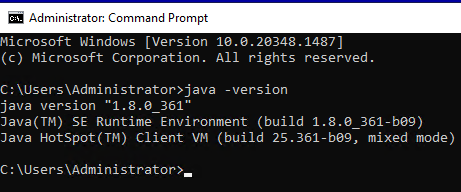
<p>Open a Command Prompt and run:</p>
<pre><code>java -version<br></code></pre>
<p>Note the single dash — it is <code>-version</code>, not <code>--version</code>. You should see the installed JRE details. If you get an error, the environment variable is not set correctly or the reboot did not happen.</p>
<figure class="post__image post__image--center"><img loading="lazy"  src="https://www.conram.it/soholab/media/posts/43/java-version.png" alt="" width="461" height="192" sizes="(max-width: 1920px) 100vw, 1920px" srcset="https://www.conram.it/soholab/media/posts/43/responsive/java-version-xs.webp 640w ,https://www.conram.it/soholab/media/posts/43/responsive/java-version-sm.webp 768w ,https://www.conram.it/soholab/media/posts/43/responsive/java-version-md.webp 1024w ,https://www.conram.it/soholab/media/posts/43/responsive/java-version-lg.webp 1366w ,https://www.conram.it/soholab/media/posts/43/responsive/java-version-xl.webp 1600w ,https://www.conram.it/soholab/media/posts/43/responsive/java-version-2xl.webp 1920w"></figure>
<h3>Step 5 — Copy javax.activation.jar into the Java /bin/ Folder</h3>
<p>From the downloaded package, copy the file <code>javax.activation.jar</code> into the <code>/bin/</code> subfolder of your Java installation:</p>
<pre><code>C:\OracleJRE32\bin\</code></pre>
<p>This file is listed as a separate download in the official <code>ReadMe.txt</code> and it is not optional — without it, MSM will fail to locate the server. It is included in the package to save you the hunt.</p>
<h3>Step 6 — Install MSM</h3>
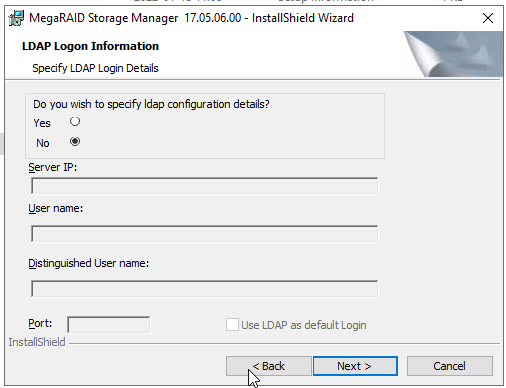
<p>Run the MSM installer. A few prompts worth noting:</p>
<figure class="post__image post__image--center"><img loading="lazy"  src="https://www.conram.it/soholab/media/posts/43/install-msm-1.png" alt="" width="506" height="388" sizes="(max-width: 1920px) 100vw, 1920px" srcset="https://www.conram.it/soholab/media/posts/43/responsive/install-msm-1-xs.webp 640w ,https://www.conram.it/soholab/media/posts/43/responsive/install-msm-1-sm.webp 768w ,https://www.conram.it/soholab/media/posts/43/responsive/install-msm-1-md.webp 1024w ,https://www.conram.it/soholab/media/posts/43/responsive/install-msm-1-lg.webp 1366w ,https://www.conram.it/soholab/media/posts/43/responsive/install-msm-1-xl.webp 1600w ,https://www.conram.it/soholab/media/posts/43/responsive/install-msm-1-2xl.webp 1920w"></figure>
<p><strong>LDAP prompt:</strong> Select <em>No</em> if you do not have a running LDAP server. Most people do not.</p>
<figure class="post__image post__image--center"><img loading="lazy"  src="https://www.conram.it/soholab/media/posts/43/install-msm-2.png" alt="" width="497" height="380" sizes="(max-width: 1920px) 100vw, 1920px" srcset="https://www.conram.it/soholab/media/posts/43/responsive/install-msm-2-xs.webp 640w ,https://www.conram.it/soholab/media/posts/43/responsive/install-msm-2-sm.webp 768w ,https://www.conram.it/soholab/media/posts/43/responsive/install-msm-2-md.webp 1024w ,https://www.conram.it/soholab/media/posts/43/responsive/install-msm-2-lg.webp 1366w ,https://www.conram.it/soholab/media/posts/43/responsive/install-msm-2-xl.webp 1600w ,https://www.conram.it/soholab/media/posts/43/responsive/install-msm-2-2xl.webp 1920w"></figure>
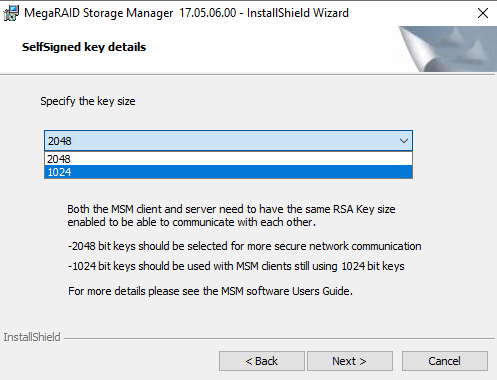
<p><strong>Key size prompt:</strong> Both 2048 and 1024 worked in testing. Either is fine.</p>
<figure class="post__image post__image--center"><img loading="lazy"  src="https://www.conram.it/soholab/media/posts/43/install-msm-3.png" alt="" width="501" height="381" sizes="(max-width: 1920px) 100vw, 1920px" srcset="https://www.conram.it/soholab/media/posts/43/responsive/install-msm-3-xs.webp 640w ,https://www.conram.it/soholab/media/posts/43/responsive/install-msm-3-sm.webp 768w ,https://www.conram.it/soholab/media/posts/43/responsive/install-msm-3-md.webp 1024w ,https://www.conram.it/soholab/media/posts/43/responsive/install-msm-3-lg.webp 1366w ,https://www.conram.it/soholab/media/posts/43/responsive/install-msm-3-xl.webp 1600w ,https://www.conram.it/soholab/media/posts/43/responsive/install-msm-3-2xl.webp 1920w"></figure>
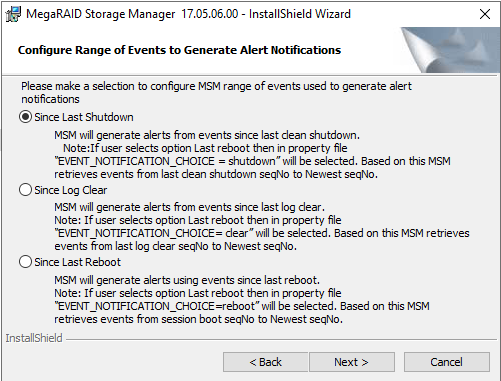
<p><strong>Remaining prompts:</strong> Default selections throughout. Nothing exotic required.</p>
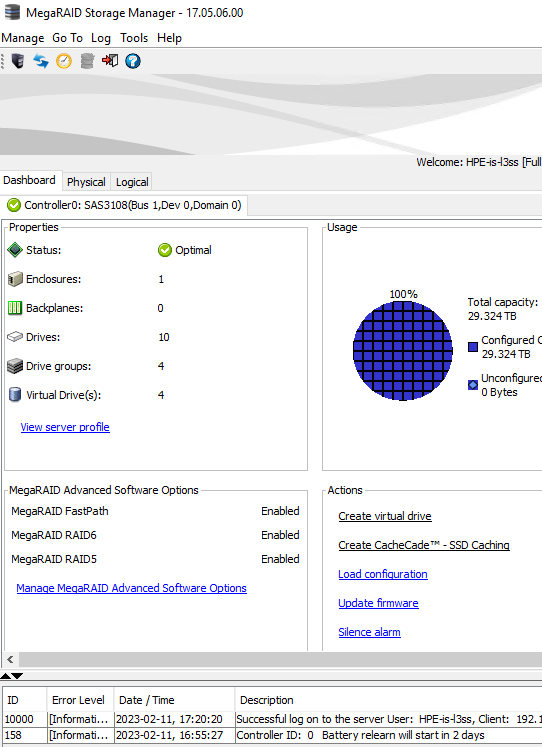
<figure class="post__image post__image--center"><img loading="lazy"  src="https://www.conram.it/soholab/media/posts/43/install-msm-4.png" alt="" width="542" height="747" sizes="(max-width: 1920px) 100vw, 1920px" srcset="https://www.conram.it/soholab/media/posts/43/responsive/install-msm-4-xs.webp 640w ,https://www.conram.it/soholab/media/posts/43/responsive/install-msm-4-sm.webp 768w ,https://www.conram.it/soholab/media/posts/43/responsive/install-msm-4-md.webp 1024w ,https://www.conram.it/soholab/media/posts/43/responsive/install-msm-4-lg.webp 1366w ,https://www.conram.it/soholab/media/posts/43/responsive/install-msm-4-xl.webp 1600w ,https://www.conram.it/soholab/media/posts/43/responsive/install-msm-4-2xl.webp 1920w"></figure>
<p>No additional reboot is needed after the MSM installation.</p>
<h2>Done</h2>
<p>MSM should now be installed and able to communicate with your RAID controller. If it cannot find the server, the most likely culprit is the missing <code>javax.activation.jar</code> — confirm it is in the right place before anything else.</p>
<p>As noted at the top, this has been tested on hardware not officially listed in the MSM supported device list. If your card is LSI-based or a rebranded variant thereof, there is a reasonable chance it works regardless of what the documentation claims.</p>
            ]]>
        </content>
    </entry>
    <entry>
        <title>SFTP with Installatron and Bitvise</title>
        <author>
            <name>Richard</name>
        </author>
        <link href="https://www.conram.it/soholab/sftp-with-installatron-and-bitvise.html"/>
        <id>https://www.conram.it/soholab/sftp-with-installatron-and-bitvise.html</id>

        <updated>2023-02-07T15:04:00+01:00</updated>
            <summary type="html">
                <![CDATA[
                    Heads up: This solution has since been retired from the author's own setup. Not because it is broken or flawed — it worked well — but circumstances changed. The guide remains accurate and relevant for anyone in the intended situation. If you run personal or&hellip;
                ]]>
            </summary>
        <content type="html">
            <![CDATA[
                <blockquote>
<div class="notice notice--warning"><strong>Heads up:</strong> This solution has since been retired from the author's own setup. Not because it is broken or flawed — it worked well — but circumstances changed. The guide remains accurate and relevant for anyone in the intended situation.</div>
</blockquote>
<p class="post-intro">If you run personal or non-profit websites on shared hosting, you probably already know that Installatron handles backups reasonably well — right up until your site grows large enough that keeping backups on the same host starts eating into your allocated space.</p>
<p>At which point you need somewhere else to put them. This is that somewhere else.</p>
<p>FTP is not the answer. FTP/S is marginally better but still not advisable. WebDAV exists if you enjoy configuring things that were not designed to be easy. The cleaner option is SFTP — encrypted, SSH-based, and straightforward to set up on a Windows machine with <a href="https://www.bitvise.com/ssh-server" target="_blank" rel="noopener">Bitvise SSH Server</a>. <a href="https://en.wikipedia.org/wiki/SSH_File_Transfer_Protocol" target="_blank" rel="noopener">SFTP is an SSH protocol</a> and is considered secure when properly maintained. FTP is not. That is not a matter of opinion.</p>
<p>This guide covers setting up Bitvise as an SFTP target on a Windows machine and pointing <a href="https://www.installatron.com" target="_blank" rel="noopener">Installatron</a> at it for automated offsite backups.</p>
<h2>What You Need</h2>
<ul>
<li>A Windows machine — physical or virtual, does not matter. A repurposed server works fine.</li>
<li>Bitvise SSH Server — <strong>free for personal use</strong> with reasonable limitations.</li>
<li><figure class="post__image post__image--right"><img loading="lazy"  style="margin-bottom: 1.37143rem; margin-left: 1.37143rem; outline: rgba(13, 139, 242, 0.55) solid 2.66667px !important;" src="https://www.conram.it/soholab/media/posts/44/Bitvise-2.png" alt="" width="415" height="137" sizes="(max-width: 1920px) 100vw, 1920px" srcset="https://www.conram.it/soholab/media/posts/44/responsive/Bitvise-2-xs.webp 640w ,https://www.conram.it/soholab/media/posts/44/responsive/Bitvise-2-sm.webp 768w ,https://www.conram.it/soholab/media/posts/44/responsive/Bitvise-2-md.webp 1024w ,https://www.conram.it/soholab/media/posts/44/responsive/Bitvise-2-lg.webp 1366w ,https://www.conram.it/soholab/media/posts/44/responsive/Bitvise-2-xl.webp 1600w ,https://www.conram.it/soholab/media/posts/44/responsive/Bitvise-2-2xl.webp 1920w"></figure> See the <a href="https://www.bitvise.com/ssh-server-usage-faq#personal-edition" target="_blank" rel="noopener">personal edition FAQ</a>. Commercial licensing is available at $95/year for basic use.</li>
<li> </li>
<li>Installatron running on your webhost — standard on many shared hosting control panels.</li>
<li>Access to your router for port forwarding.</li>
<li>A non-default port number. Port 22 is SFTP's default and a magnet for scanners. Pick something else — anything unused on your network. This guide uses <code>33391</code> as an example.</li>
</ul>
<h2>Network Setup — Port Forwarding</h2>
<p>Before anything else, set up port forwarding on your router to direct your chosen port to the Windows machine running Bitvise. The specifics vary by router — <a href="https://www.portforward.com" target="_blank" rel="noopener">portforward.com</a> has guides for most brands.</p>
<p>Once configured, verify the port is actually open before proceeding. There is no point configuring Bitvise against a closed network path.</p>
<h3>Dynamic IP — Worth Addressing Early</h3>
<p>If your home internet connection uses a dynamic IP address (most residential connections do), you will need a DNS forwarding service to keep the address resolvable. Several providers offer this free for a single host. Portforward.com covers this as well. Sort it before you go further — discovering it mid-setup is avoidable frustration.</p>
<h2>Setting Up Bitvise</h2>
<p>Install Bitvise from <a href="https://www.bitvise.com/ssh-server" target="_blank" rel="noopener">bitvise.com</a> and configure the following:</p>
<h3>Port</h3>
<p>Set Bitvise to listen on your forwarded port (<code>33391</code> in this example). Avoid well-known ports — the <a href="https://en.wikipedia.org/wiki/List_of_TCP_and_UDP_port_numbers" target="_blank" rel="noopener">full list is on Wikipedia</a> if you need to check for conflicts. Ref: <a href="https://www.bitvise.com/ssh-server-guide-connecting" target="_blank" rel="noopener">Bitvise connection guide</a>.</p>
<h3>Virtual Account</h3>
<p>Create a virtual account — not a Windows account. The distinction matters for security. A virtual account is isolated and cannot be used to authenticate against Windows itself. Use a complex, lengthy username and password combination. This account will be accessible from the open internet; treat it accordingly. Something like <code>mysftpaccounttobitvise</code> with a password along the lines of <code>1FAVbJhZJvDoD2xS53gn97Ied</code> gives the right idea. Ref: <a href="https://www.bitvise.com/ssh-server-guide-config-for-sftp" target="_blank" rel="noopener">Bitvise SFTP configuration guide</a>.</p>
<h3>Backup Folder</h3>
<p>Create a dedicated folder for backups and point the virtual account's root there. Keep it on a separate drive from the system drive — easier to monitor, easier to manage, and keeps backup data away from anything critical if something goes wrong.</p>
<h3>Security</h3>
<p>Read the <a href="https://www.bitvise.com/ssh-server-guide-securing" target="_blank" rel="noopener">Bitvise securing guide</a> before going live. At minimum, restrict access to the IP address ranges of your webhost. Check the Bitvise activity log regularly — it is informative and will tell you early if something unexpected is attempting to connect.</p>
<h2>Windows Firewall</h2>
<p>Add an inbound rule in Windows Firewall allowing your chosen port. Start permissive — any protocol, any IP — and tighten once you have confirmed the connection works. Name the rule clearly; a rule called <em>"33391 – Bitvise SFTP"</em> is significantly easier to find six months later than one called <em>"New Inbound Rule 4"</em>.</p>
<p>Make notes when you change firewall settings. It is easy to tick a box that seems like a security improvement and then forget about it entirely until connectivity breaks.</p>
<h2>Windows Ransomware Protection (Controlled Folder Access)</h2>
<p>If Windows Defender's Controlled Folder Access is enabled, it will block Bitvise from writing to the file system. You will need to explicitly allow the Bitvise service as a permitted application. This is another reason to use a dedicated backup folder on a dedicated drive — it makes the exception scope clean and obvious. Ref: <a href="https://docs.microsoft.com/en-us/microsoft-365/security/defender-endpoint/controlled-folders" target="_blank" rel="noopener">Microsoft — Controlled Folder Access</a>.</p>
<h2>Configuring Installatron</h2>
<p>In the Installatron backup interface, you will need five things. Be precise — spaces and<figure class="post__image post__image--right"><img loading="lazy"  src="https://www.conram.it/soholab/media/posts/44//installatron_button_e.png" alt="" width="143" height="191" sizes="(max-width: 1920px) 100vw, 1920px" srcset="https://www.conram.it/soholab/media/posts/44//responsive/installatron_button_e-xs.webp 640w ,https://www.conram.it/soholab/media/posts/44//responsive/installatron_button_e-sm.webp 768w ,https://www.conram.it/soholab/media/posts/44//responsive/installatron_button_e-md.webp 1024w ,https://www.conram.it/soholab/media/posts/44//responsive/installatron_button_e-lg.webp 1366w ,https://www.conram.it/soholab/media/posts/44//responsive/installatron_button_e-xl.webp 1600w ,https://www.conram.it/soholab/media/posts/44//responsive/installatron_button_e-2xl.webp 1920w"></figure> stray characters will cause silent failures:</p>
<ul>
<li><strong>Address</strong> — hostname or IP of your Bitvise machine</li>
<li><strong>Port</strong> — your forwarded port (<code>33391</code>)</li>
<li><strong>Username</strong> — your Bitvise virtual account username</li>
<li><strong>Password</strong> — the corresponding password</li>
<li><strong>Path</strong> — the backup folder path; forward and backward slashes are both accepted</li>
</ul>
<p>Save each step in Installatron before moving to the next. It does not always retain unsaved changes when you navigate away. Run a manual backup first and confirm files actually appear at the destination before trusting the scheduled automation.</p>
<p>Backup files are stored as <code>.gz</code> archives — Linux compression, but readable and extractable on Windows with <a href="https://www.rarlab.com" target="_blank" rel="noopener">WinRAR</a> or <a href="https://www.7-zip.org" target="_blank" rel="noopener">7-Zip</a>.</p>
<h2>FAQ</h2>
<dl>
<dt>Will this use up my host's bandwidth allowance?</dt>
<dd>Yes. Backup transfers count against your hosting bandwidth. Several hundred GB in a week is not implausible for larger sites. Check your hosting agreement before enabling scheduled backups.</dd>
<dt>Connection works but no files are appearing at the backup location.</dt>
<dd>Check Windows Firewall first. If Controlled Folder Access (Ransomware Protection) is enabled, it may be blocking the Bitvise service from writing. Also verify the virtual account has write access to the target folder root.</dd>
<dt>Multiple Installatron instances are all writing to the same folder despite different paths being set.</dt>
<dd>On some hosting control panels (DirectAdmin in particular), the active domain context matters when configuring Installatron backup settings. Make sure the correct domain is selected in the control panel before touching the backup configuration for that site — even if all sites appear in a single list.</dd>
<dt>Installatron reset the backup destination back to the webhost by itself.</dt>
<dd>Usually indicates the backup encountered an error, or the connection was never properly tested after setup. Check whether any files were created at the SFTP destination, and check adjacent folders. Also verify you are not accumulating unexpected backups on the webhost and consuming space you had not planned for. Starting fresh with that site's backup config is often the quickest resolution.</dd>
<dt>How do I restore from these backups?</dt>
<dd>If Installatron can locate and recognise the backup package directly from the SFTP path, restoration is straightforward. If not, upload the archive to a folder on the host and unpack it there, then point Installatron at the existing backup in its default local folder. Worst case — manual database restore and file upload. If you have any experience managing web applications, you already know how that works.</dd>
</dl>
<p><em>The author of this text is not affiliated with Bitvise, Installatron, or any other product mentioned.</em></p>
            ]]>
        </content>
    </entry>
    <entry>
        <title>Digitus Label Template</title>
        <author>
            <name>Richard</name>
        </author>
        <link href="https://www.conram.it/soholab/digitus-label-template.html"/>
        <id>https://www.conram.it/soholab/digitus-label-template.html</id>
            <category term="patch"/>
            <category term="panel"/>
            <category term="network"/>
            <category term="digitus"/>

        <updated>2022-12-13T13:44:00+01:00</updated>
            <summary type="html">
                <![CDATA[
                    I made an Excel template! 😇 Makes for a lot of possible variations, like fonts and colours, and it is way cheaper than buying it, if even found. I recommend printing it on a little thicker paper than normal, perhaps A4 90gr quality or even&hellip;
                ]]>
            </summary>
        <content type="html">
            <![CDATA[
                <h3>I made an Excel template! 😇</h3>
<p>Makes for a lot of possible variations, like fonts and colours, and it is way cheaper than buying it, if even found. I recommend printing it on a little thicker paper than normal, perhaps A4 90gr quality or even heavier.</p>
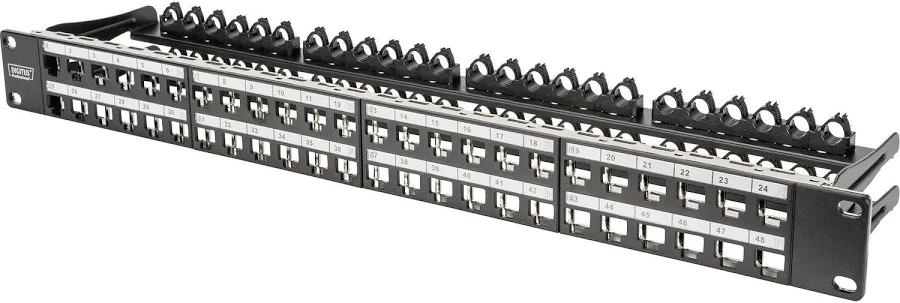
<p>Please note this is for the <strong>1U</strong> Digitus 48 Port High Density panel, I have no clue as if the measurements would fit other variants, but it is not hard to change.</p>
<figure class="post__image"><img loading="lazy"  src="https://www.conram.it/soholab/media/posts/38/digitus.png" alt="" width="900" height="303" sizes="(max-width: 1920px) 100vw, 1920px" srcset="https://www.conram.it/soholab/media/posts/38/responsive/digitus-xs.webp 640w ,https://www.conram.it/soholab/media/posts/38/responsive/digitus-sm.webp 768w ,https://www.conram.it/soholab/media/posts/38/responsive/digitus-md.webp 1024w ,https://www.conram.it/soholab/media/posts/38/responsive/digitus-lg.webp 1366w ,https://www.conram.it/soholab/media/posts/38/responsive/digitus-xl.webp 1600w ,https://www.conram.it/soholab/media/posts/38/responsive/digitus-2xl.webp 1920w"></figure>
<p>Download xlxs file <a href="https://www.conram.it/soholab/patch-panel-template.xlsx" title="Digitus Patch Panel Template" target="_blank" rel="noopener noreferrer">here</a>.</p>
            ]]>
        </content>
    </entry>
</feed>